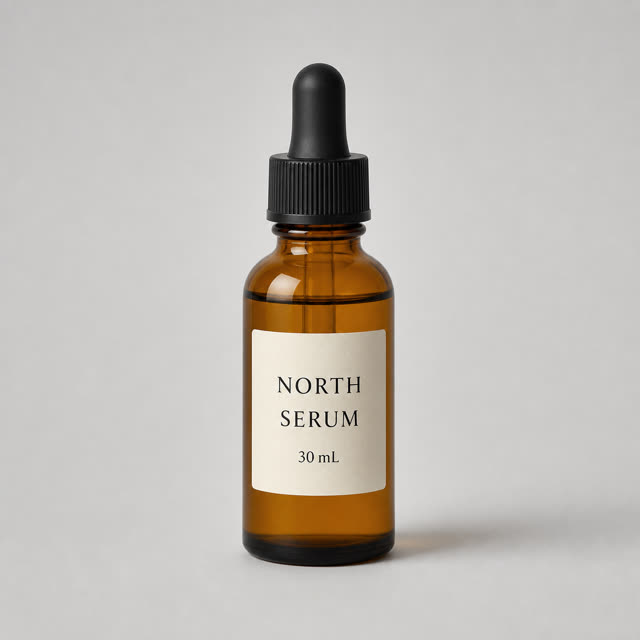
Original bottle
ControlAmber glass, black ribbed cap, and a cream label reading “NORTH / SERUM / 30 mL”.
This guide is for ecommerce sellers and catalog teams choosing between marketplace cleanup, lifestyle scenes, batch editing, API automation, and campaign design. Start with PhotoRoom for most seller workflows or Claid.ai for API-scale image pipelines, then use the decision routes below.
Pricing and free limits change often. Use this guide for workflow selection, then verify the current plan details on each vendor site before buying.
PhotoRoom is the best first pick for most ecommerce sellers because it covers background removal, AI scenes, batch editing, mobile editing, and marketplace-style outputs in one workflow. Pixelcut is strong for lean shops that want product photos plus simple marketing assets. Pebblely, Flair AI, and Mokker AI are useful when the main job is lifestyle product imagery. Claid.ai is the better fit for API-driven catalog operations and large image pipelines.
Do not choose a tool only because the generated image looks pretty in a demo. Product photo work is judged by repeatability: accurate product shape, believable shadows, marketplace crop control, batch operations, export quality, team review, and whether the final image can be reused across product detail pages, ads, email, and social posts.
Use this table to route the job before testing tools. A single ecommerce team may use one quick editor, one bulk/API tool, and one broader design tool rather than forcing every photo task through the same product.
| Tool | Best for | Input workflow | Catalog readiness | Main caveat |
|---|---|---|---|---|
| PhotoRoomCompare alternatives → | General ecommerce product photos | Upload product photo, remove background, generate scenes, batch edit | High for sellers and small teams | Not a full design suite or 3D tool |
| PixelcutCompare alternatives → | Lean brands and marketplace sellers | Mobile/web editing, background removal, AI product photos, templates | High for small catalogs | Less suited to complex enterprise image pipelines |
| PebblelyCompare alternatives → | Fast lifestyle scenes | Upload product, describe background, generate multiple scenes | Medium to high for campaign refreshes | Needs review for product accuracy and shadow realism |
| Claid.aiCompare alternatives → | API and high-volume image operations | Automated enhancement, background work, resizing, API processing | High for catalog teams | More technical setup than a simple editor |
| Flair AICompare alternatives → | Brand-directed creative scenes | Build or prompt product scenes with brand objects and lighting | Medium for creative teams | Requires more art direction than one-click editors |
| Mokker AICompare alternatives → | Product lifestyle backgrounds | Upload a product image and create studio or lifestyle variations | Medium for sellers and agencies | Less broad than Canva or Adobe for general design |
| Canva | Marketing layouts around product images | Use product photo assets in brand kits, social posts, ads, and templates | Medium for product images, high for marketing assets | Product photo generation is one part of a broader design platform |
| Picsart | Creator-style image editing | Background removal, AI editing, design effects, social-ready exports | Medium for lightweight seller workflows | Creative effects can drift away from accurate product representation |
| Shopify Magic | Shopify-native store workflows | Native Shopify AI support across product content and store operations | High inside Shopify, limited outside it | Best value appears when the store already runs on Shopify |
| CreatorKit | Product ads and video-style ecommerce creative | Turn product assets into templates, ads, and ecommerce visuals | Medium for product campaigns | Choose it for performance creative, not strict catalog normalization |
Authenticated test · July 31, 2026
We uploaded the same amber serum bottle and asked each available tool for the same warm bathroom lifestyle scene. We checked product fidelity, label text, scene control, export access, and workflow friction.
Place this exact bottle on a warm limestone bathroom shelf with soft daylight from the left. Create a clean 4:5 ecommerce lifestyle image. Preserve the bottle shape, black cap ribs, amber glass, liquid line, label dimensions, and the exact text “NORTH / SERUM / 30 mL”. Do not add a second product, hands, logos, or new label text.
Amber glass, black ribbed cap, and a cream label reading “NORTH / SERUM / 30 mL”.
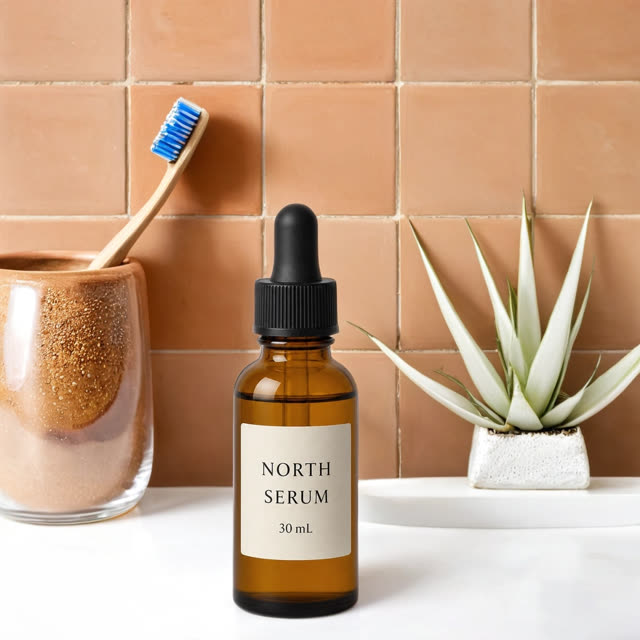

Mokker produced the most faithful usable image among the tools that completed generation. This supports a product-fidelity finding for this run; it does not by itself make Mokker the best tool for every ecommerce workflow.
Access findings are reported separately from output quality.
The shared setup reached generation, but the request returned a Pro upgrade gate. No output was available to score.
The authenticated workspace showed no credits remaining and required a subscription before generation.
The public page promotes free generations, while the logged-in Free Plan showed AI Product Photos disabled.
Product silhouette · Label accuracy · Cap, glass, and liquid · Lighting and grounding · Prompt alignment · Export and watermark · Retry cost · Workflow friction
Plan limits, credits, and product behavior can change. We report what the authenticated accounts showed on the test date and keep this run separate from broader judgments about mobile editing, APIs, batch operations, teams, and catalog scale.
Tested July 31, 2026 using one shared source image and one shared prompt. Vendor access was not sponsored. No output score was assigned when generation was unavailable.
Best for most ecommerce sellers
PhotoRoom is the strongest default because it is purpose-built for product images rather than general image generation. It handles background removal, white backgrounds, AI-generated lifestyle scenes, brand templates, resizing, mobile editing, and batch workflows. For a seller who needs new marketplace images this week, PhotoRoom usually creates the shortest path from raw phone photo to usable listing asset.
Use it when: Etsy, Amazon, Shopify, eBay, or direct-to-consumer images need fast cleanup and consistent output.
Read PhotoRoom reviewVisitBest for small teams that want product photos plus marketing assets
Pixelcut combines AI product photos, background removal, upscaling, templates, and mobile-first editing. It is a practical choice for small brands that do not have a dedicated designer but need clean listing photos, social images, and simple product promotions from the same source material.
Use it when: the same person is creating listing images, short promotions, and social posts.
VisitBest for quick lifestyle image variants
Pebblely is focused on AI product photography: upload a product image, choose or describe a setting, and generate product scenes for campaigns, ads, and secondary listing slots. It is strongest when the job is not a plain cutout but a series of believable product-in-context images.
Use it when: a catalog needs seasonal scenes, landing page visuals, or ad variants without a studio shoot.
VisitBest for catalog automation and API image operations
Claid.ai is closer to an image infrastructure layer than a simple seller app. It supports ecommerce image enhancement, background work, resizing, generation, and API workflows. That makes it more relevant for marketplaces, agencies, or catalog teams that need to normalize thousands of product images repeatedly.
Use it when: a product-image process needs automation, API integration, or repeatable quality control.
VisitBest for brand-directed product scenes
Flair AI is useful when a brand wants more control over the creative scene. It is not just a cutout tool; it helps teams arrange product visuals, props, and style direction for ad-like product photography. That makes it a fit for creative teams that need stronger brand composition than a one-click background swap.
Use it when: product images need a specific campaign look, art direction, or repeatable creative style.
VisitBest for AI background refreshes
Mokker AI is a focused product photography tool for turning product cutouts into studio or lifestyle scenes. It is a sensible option when an ecommerce team has acceptable product source images but needs more visual variety for ads, category pages, and product detail pages.
Use it when: the main problem is background variety rather than full catalog infrastructure.
VisitBest for product images inside marketing layouts
Canva is not only a product photo generator. Its value is the design layer around product images: templates, brand kits, social formats, ads, pitch decks, and quick resizing. Use a specialized photo tool to clean the product first, then use Canva when the final asset needs layout, copy, and brand consistency.
Use it when: product photos need to become social posts, banners, ads, or email graphics.
Canva AI reviewVisitBest for creator-style ecommerce visuals
Picsart works well when product images need creator-style editing, quick effects, background changes, and social-ready exports. It is especially useful for lightweight shops that treat product visuals and content creation as one workflow. Keep edits restrained when the image is used for marketplace listings.
Use it when: the asset is for social, ads, or visual content rather than a strict main product listing image.
VisitBest for stores already running on Shopify
Shopify Magic is relevant because product images do not live alone; they connect to product descriptions, store pages, email, ads, and merchandising. Shopify merchants should evaluate native AI support before adding another standalone tool, especially when the goal is to speed up store operations rather than create one isolated image.
Use it when: the product image task is part of a Shopify store workflow, not a separate creative pipeline.
VisitBest for product creative that turns into ads
CreatorKit fits the performance creative side of ecommerce. It is most useful when product images need to become ad-ready visuals, templates, or video-style commerce assets. Choose it after the source image is accurate and clean, then use it to create campaign output.
Use it when: the objective is ad creative and ecommerce content, not just a catalog image refresh.
VisitMain images need accuracy, plain background control, and no misleading edits. Lifestyle images can use stronger AI scene generation, but they still need review for product scale, reflections, shadows, and material accuracy.
Transparent bottles, jewelry, reflective metal, soft fabric, fur, bundles, and white-on-white products expose weak cutouts quickly. A tool that works on the hard sample will usually work on the rest of the catalog.
A good demo image is not enough. Test twenty products with the same output size, scene style, and export settings. The best tool is the one that keeps the product position, lighting direction, and brand look consistent.
Manual tools are faster for small shops. API tools are better when images come from suppliers, vendors, sellers, or catalog imports and need automatic enhancement before publishing.
Use an original studio photograph or professional shoot when exact physical accuracy, regulated claims, reflective materials, or premium campaign art direction cannot be verified from an AI output.
The AI editor is only one step. A product image can look polished and still fail a marketplace upload, search thumbnail, or main-image policy. Keep the untouched source photo and review the final export against the destination channel.
| Channel | What to check | Practical AI-photo rule |
|---|---|---|
| Amazon MAIN image | Accurate real product, complete product in frame, roughly 85% image fill, one unit, no promotional text/review graphics/marketplace-style badges. | Use AI for cleanup only when the output still matches the real item's shape, quantity, color, included accessories, and packaging state. Put stronger lifestyle generation in secondary images, not the MAIN slot. |
| Etsy listing photos | Supported file type; Etsy recommends listing images at least 2000px wide/high, and the first image should be at least 635px in both dimensions. Dark, blurry, or collage-style primary images can hurt listing quality/search presentation. | Export a clean high-resolution first image and inspect Etsy's cropped thumbnail. Avoid relying on transparent PNG: Etsy says transparent areas display black. |
| Shopify product media | Images can be up to 5000×5000px or 25MP and must be under 20MB; Shopify says square product images around 2048×2048 usually display best. | Keep featured-image aspect ratios consistent across the catalog. Shopify can serve optimized formats through its CDN, so optimize for source quality and consistency rather than manually creating a different image for every viewport. |
Marketplace requirements checked September 26, 2026. Category-specific rules can be stricter than the general image guidance, so the marketplace's current listing policy remains the final source of truth.
AI product photo tools solve the 2D image problem: cleaner backgrounds, better crops, stronger lifestyle scenes, and faster campaign variants. They do not create an inspectable object. If a buyer, designer, game team, or product marketer needs rotation, AR preview, model-viewer placement, or reusable 3D formats, the workflow should shift after photo cleanup.
A practical route is: clean the source image in PhotoRoom, Pixelcut, or Claid, verify that the product silhouette is accurate, then send the cleaned visual into a 3D-specific workflow such as Image3D. Keep this boundary clear: product photo tools create ecommerce images; 3D tools create assets that can be inspected, rotated, or reused beyond a flat listing.
Compare AI 3D model generators Read Image3D reviewUse this checklist before paying for any AI product photography tool. It keeps the decision tied to real ecommerce output rather than polished vendor examples.
| Check | Pass condition | Why it matters |
|---|---|---|
| Product fidelity | The product shape, color, material, packaging, and logo remain accurate. | AI changes that look small can create refund risk and marketplace policy issues. |
| Background control | The tool can produce plain white, transparent, brand color, and lifestyle outputs. | Different channels require different image types. |
| Batch consistency | Twenty products can be edited with matching crop, padding, and lighting direction. | Catalog pages look weaker when every image uses a different visual system. |
| Export readiness | Exports are large enough, clean enough, and formatted for store and ad channels. | Low-resolution or wrongly cropped exports create rework. |
| Team review | A human can approve, reject, and revise outputs before publishing. | Product imagery should never be fully unattended for brand or compliance use. |
| 3D boundary | The team knows when to move to Image3D or another model workflow. | Flat-image tools should not be treated as AR, 3D, or configurator tools. |
PhotoRoom is the best first pick for most sellers because it combines background removal, AI backgrounds, templates, batch editing, mobile apps, and ecommerce workflow support. Claid.ai is better for API and large catalog operations. Pebblely, Flair AI, and Mokker are stronger when the main output is lifestyle product imagery.
Shopify sellers should compare PhotoRoom, Pixelcut, and Shopify Magic first. PhotoRoom and Pixelcut are faster for standalone image editing. Shopify Magic is worth checking when the image work connects directly to Shopify product pages, descriptions, and store operations.
They can replace many routine ecommerce shoots, especially background cleanup, lifestyle variants, seasonal scenes, and simple marketplace crops. They do not fully replace professional photography for premium brand campaigns, reflective products, complex materials, regulated claims, or campaigns that need physical art direction.
Use them only when the output still represents the real item accurately. Amazon's current MAIN image rules require an accurate professional product image, the complete product in frame, roughly 85% image fill, one unit, and no promotional text, review graphics, or marketplace-style badges. Stronger AI lifestyle generation belongs in secondary images, not the MAIN slot.
Skip it when exact physical accuracy, regulated claims, reflective or transparent materials, or premium campaign art direction cannot be verified from the output. Use an original studio photograph or professional shoot instead.
Upload a difficult real product, reuse one detailed prompt, and compare product shape, label text, materials, lighting, crop, export access, watermark, and retry cost. A polished sample gallery is not a substitute for testing your own product.
Use Image3D when the product needs to become an inspectable or reusable 3D asset rather than another flat image. Examples include AR previews, game objects, model viewers, product configurators, or GLB, OBJ, STL, and similar handoff formats.
AI Tool Finder accepts free tool submissions, factual corrections, and separately reviewed commercial placement requests. Payment does not guarantee an organic recommendation or change this guide's editorial verdict. Sponsored placements are labeled.
Vendor positioning, plan details, and authenticated access states were rechecked on July 30–31, 2026. The controlled bottle test used the same source image and prompt where generation was available. Marketplace image requirements for Amazon, Etsy, and Shopify were rechecked against their official help pages on September 26, 2026. Pricing, free limits, product behavior, and marketplace rules can change, so treat the vendor or channel's current policy as the source of truth before purchase or publication.
If the next task is rearranging elements rather than generating a product photo, see Seedream 5.0 Layers inside Runway for transparent layer export and the documented per-run credit cost.