All tools / MiniMax M3.1 Flash
Product updateMiniMax M3.1 Flash
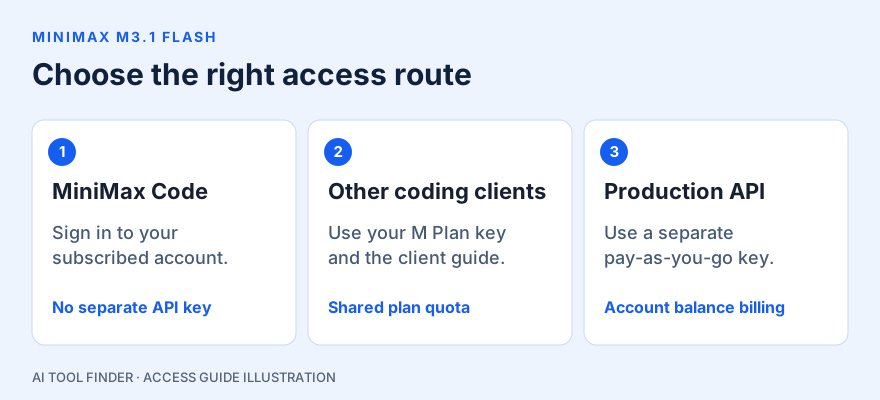
Coding Plan, current M Plan tiers and setup. Use a subscription in MiniMax Code or a supported coding client, choose pay-as-you-go for a production API, or plan a self-hosted deployment.
MiniMax M3.1 Flash weights are publicly available in the official Hugging Face repository. The release supports text, image and video input with text output. Choose a hosted service for a quick evaluation, or review the deployment recipes before downloading the weights.
M Plan Product information dated October 29, 2026 · Open-weight and deployment Product information dated October 23, 2026
MiniMax Coding Plan is now documented under M Plan
Looking for the MiniMax Coding Plan? Its old documentation URL now redirects to the M Plan overview. The current subscription tiers are Go, Explore and Build. M3.1 Flash is the model; M Plan is one way to access it and other MiniMax capabilities.
Use MiniMax Code with your subscribed account, or connect a supported coding client with an M Plan API key. Downloading the open weights is a separate choice and does not provide hosted subscription usage.
Current M Plan tiers and prices
| Tier | Regular monthly price | Usage relative to Go | H3 video | Intended use |
|---|---|---|---|---|
| Go | US$22/month | 1× | Not included | Light use |
| Explore | US$55/month | 3× | Included | Everyday use |
| Build | US$132/month | 7.5× | Included | Heavy use |
These are the regular monthly rates displayed by MiniMax’s official M Plan page, checked October 29, 2026. Introductory discounts are separate from renewal pricing; check the offer, billing period and final total before subscribing.
All three tiers include M3.1 Flash, image and audio generation, web search and multimodal understanding. Only Explore and Build include H3 video. The usage multiples describe plan quota, not fixed message counts, token allowances or speed improvements. Request size, model, modality and reasoning effort affect consumption. Models and usage explained by MiniMax.
Existing Token Plan subscribers
Token Plan is closed to new purchases. Existing subscribers can retain their plan and original renewal terms while auto-renewal remains on, or choose an eligible M Plan upgrade. An upgrade cannot be reversed to Token Plan, and historical discounts or extra benefits do not carry over. Treat old Plus, Max and Ultra offers separately from today’s Go, Explore and Build table. Official Token Plan notice.
Connect M3.1 Flash to your coding workflow
- Choose your route. If you use MiniMax Code, sign in with the account that holds the subscription; no separate subscription or M Plan API-key setup is needed. For another supported client, find the M Plan API key in Plan Details. Keep that key private.
- Follow the guide for your client. MiniMax lists Claude Code, Codex, Cursor, OpenCode and other compatible tools. Follow the relevant client guide in the M Plan documentation; do not paste one client’s configuration into a different client.
- Check the active provider and model. For the documented Claude Code route, MiniMax provides this setup wizard:
npx -y mmx-cli@latest agent setupSelect Claude Code. The wizard updates ~/.claude/settings.json and adds MiniMax models; if Claude Code is missing, it can offer to install it. Review existing provider settings before applying the change. Official Claude Code setup and complete manual configuration.
| Connection field | Documented value | What to check |
|---|---|---|
| Anthropic-compatible base URL | https://api.minimax.io/anthropic | ANTHROPIC_BASE_URL in the Claude Code configuration |
| Credential | Your M Plan API key | ANTHROPIC_AUTH_TOKEN for this Claude Code setup; do not substitute a pay-as-you-go key |
| Model | MiniMax-M3.1-Flash | The official Claude Code configuration uses MiniMax-M3.1-Flash[1m] for its context declaration |
Inside Claude Code, use /status to inspect the provider base URL and /model to confirm the selected model. Existing shell variables can override the settings file, so resolve conflicting provider settings if the displayed values differ. The table summarizes connection fields; use the full official example for context and effort settings. Configuration checks.
Shared usage limits and billing
Included quota is used first. Once a limit is reached, supported requests can consume available purchased credit packs by default. An M Plan key does not then charge your ordinary account balance; that balance is used by a separate pay-as-you-go API key. Check Plan usage for remaining quota, Credits and history. Key types and overflow billing.
You can wait for a reset, select a higher tier or use a separate pay-as-you-go setup when appropriate. Request rate limits also apply and may tighten at busy times, even with quota remaining. MiniMax positions M Plan for individual, interactive developer work and recommends pay-as-you-go for production workloads. Limits and production guidance.
For the client choice, compare GitHub Copilot’s Projects and Fusion workflows or browse AI coding assistants. Those products’ subscriptions and entitlements are separate from MiniMax M Plan.
What can you download?
The model card describes a mixture-of-experts model with approximately 428 billion total parameters, 23 billion active per token and up to a one-million-token context window. The repository includes a DSpark draft head. Its license is MiniMax Community; review the actual license before use or redistribution. Open weights do not mean unrestricted usage.
Choose your access route
Hosted evaluation
Use MiniMax Code or the developer platform if you want to assess a task without provisioning inference hardware. Check account access, current charges and data handling on that service.
Self-hosted deployment
The model card points to SGLang, vLLM and TokenSpeed recipes. It lists several other integrations as in progress. Use the recipe for this exact release instead of assuming that every Transformers example already works.
Download only after planning the deployment
The model card provides this Hugging Face CLI command:
hf download MiniMaxAI/MiniMax-M3.1-Flash --local-dir MiniMax-M3.1-FlashThis downloads files; it does not start an inference server. First check storage, GPU memory and the serving implementation. Active parameter count is not a hardware memory estimate. The usable context and throughput depend on the configuration.
A useful first evaluation
- Pick one representative coding or document task and keep a copy of its expected result.
- Start with short input and record the exact model revision, serving version and settings.
- Check the result for correctness before measuring latency. Compare identical inputs and include failed requests in the result.
- Increase context only after measuring memory use. A stated maximum context is not evidence that your own deployment can serve it reliably.
Use the model card and serving documentation to assess your hardware and workload.
Frequently asked questions
Is MiniMax Coding Plan still the current name?
The old Coding Plan documentation redirects to M Plan. Current new subscriptions use Go, Explore or Build. Existing Token Plan subscriptions have separate continuation and upgrade rules.
Does an M Plan subscription pay for every API request?
No. The client must use an M Plan API key for covered quota and credit packs. A standard API key uses pay-as-you-go billing and charges the account balance, even if you also have a subscription.
Does a new coding tool get a fresh quota?
No. MiniMax Code and other connected tools share the same plan usage. Non-video work needs quota in both the five-hour and weekly windows; video uses the weekly window only.
Why am I rate-limited when the usage bar is not full?
Request rate limits are separate from subscription usage limits. High request frequency, concurrency or peak traffic can cause throttling before the included quota runs out.
Is M Plan intended for a production application?
MiniMax describes M Plan as an individual, interactive developer subscription and recommends pay-as-you-go for production. Self-hosting the model weights is a separate deployment route.
Based on each tool's official docs, pricing and terms as of October 29, 2026. Try your own representative file and confirm the current plan before purchase.