Best Free AI Writing Tools 2026: Drafting, Editing and Research
Compare the free tiers of ChatGPT, Claude, Grammarly and LanguageTool for drafting, editing and proofreading. The free tiers differ less in quality than in caps: prompts per month, characters per check, and which features are withheld entirely.
AI Tool Finder Editorial Team · Sources checked September 17, 2026
Direct answer: pick by whether you are drafting or correcting
Use ChatGPT Free or Claude Free when you are drafting and researching, and Grammarly Free or LanguageTool Basic when you are correcting text you have already written. The drafting tools meter messages and features; the correction tools meter prompts and characters. Two different meters, and they are not substitutes for each other.
This is a documentation-verification guide. Plan names and limits below are quoted from each vendor's own pricing or plans page on the check date. We have not run the same manuscript through all four tools, so no output-quality ranking is claimed.
Four candidates were kept because they cover two distinct jobs with two tools each: drafting and research, and mechanical correction. Tools whose free tier is a short trial rather than a standing plan were excluded, because a trial cannot support an ongoing writing workflow.
The free plan documents unlimited text chats with the base model, with uploads, images, voice, deep research and memory all limited.
Best for
Working through a draft in conversation
Check first
Which features are limited rather than included
Limitations
The free tier is documented with unlimited text chats on one model, but uploads, image generation, voice, deep research, memory and Codex are all listed as limited.
The free tier is a real drafting tool, not a demo. The limitations cluster around inputs and tools rather than around text generation, which is why it suits drafting from a blank page and suits file-heavy research less well.
Official page captured 22 September 2026. Pricing and interface may change. Open the current official page. This is a source preview, not a product test result.
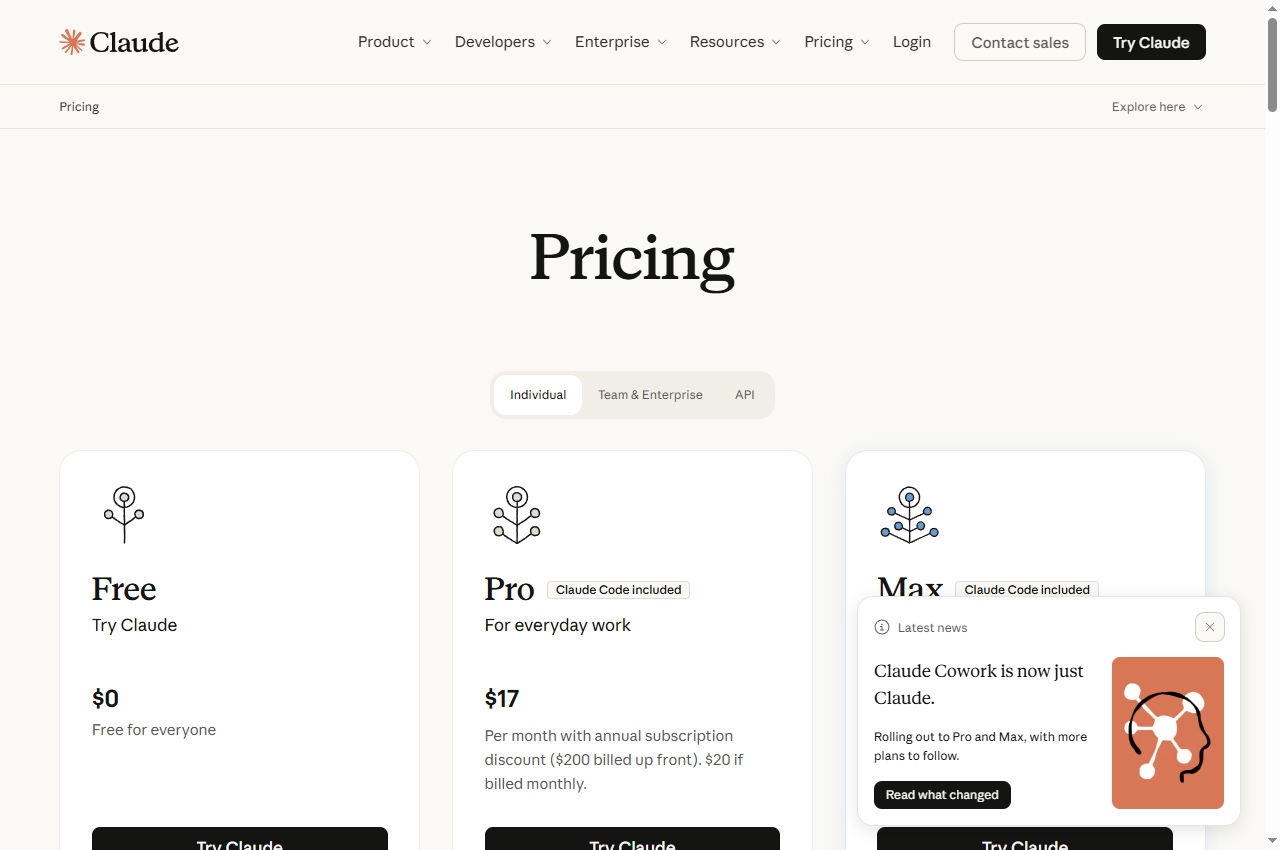
The free plan documents chat on web, desktop and mobile, web search, file creation, code execution, memory, connectors and Artifacts, with up to five projects.
Best for
Rewriting and restructuring a long document
Check first
Which models and features the free tier can reach
Limitations
The free tier is documented with chat, web search, file creation and code execution, memory and connectors, but no Claude Code, no research mode and no Opus model access.
The free tier includes more of the surrounding workflow than the price suggests: web search, file creation, code execution, memory, connectors and Artifacts. What it excludes is research mode, Claude Code and the largest model.
The free plan documents writing suggestions, tone detection and 100 AI prompts per month.
Best for
Catching mechanical errors while writing
Check first
The 100-prompt monthly AI limit
Limitations
Free is documented with basic writing suggestions, tone detection and 100 AI prompts per month; full-sentence rewrites, tone adjustment and plagiarism or AI detection are Pro features.
The free tier is a proofreading tool, not a rewriting tool. Its own comparison table places full-sentence rewrites, tone adjustment and plagiarism or AI-generated-text detection on Pro, which is the honest boundary to plan around.
The basic tier documents a 2,000-character limit per text field, three AI rephrasings per day and support for 30+ languages.
Best for
Checking short passages across many languages
Check first
The 2,000-character limit per text field
Limitations
The basic tier is documented at 2,000 characters per text field with three AI rephrasings per day and limited picky mode; the character limit is the practical constraint for long documents.
The distinguishing feature is language coverage rather than English polish. LanguageTool documents checking in more than thirty languages, which matters if you write in more than one.
Messages, feature access, prompts per month and characters per check are four different meters. Decide which job you need before comparing any of them.
Four free AI writing options compared
ChatGPT Free: drafting and general research
The ChatGPT pricing page describes the Free plan as unlimited text chats with GPT-5.6 Luna, subject to abuse guardrails, with the free tier's context described in pages of text rather than tokens. The same table lists uploads, image generation, voice chats, deep research, memory and Codex access as limited on free.
The feature comparison separates the tiers by access rather than by price alone. Go is described as adding more messages with tools, more uploads, more image creation, more voice chats and longer memory, and it introduces features such as scheduled tasks and custom GPTs that free does not list. Plus adds the advanced reasoning models and turns several limited rows into yes.
For a writer, the practical reading is that free is sufficient for prose but restrictive for source-heavy work. If your process depends on uploading documents, extracting from them and holding a long context, the free tier's limits on uploads and context will be the binding constraint rather than message volume.
When to skip: if your workflow depends on uploading long source documents or on deep research, both of which are documented as limited on the free plan.
Claude's pricing page describes the Free plan at $0 with chat on web, desktop and mobile, the ability to search the web, create files and run code, memory across conversations, connectors, Artifacts, desktop extensions, voice mode, incognito chats and up to five projects. Its model table lists Sonnet and Haiku as available and Opus as not available on free.
The feature comparison shows what the paid step adds: research mode, Claude Code, Claude Design, Slides and Docs, more models, and higher usage. Pro is listed at $17 per month with an annual subscription discount, or $20 billed monthly; Max starts from $100 per month with a choice of five or twenty times the Pro usage.
For drafting and revision, the free tier's combination of memory, projects and file creation covers a large part of a normal writing workflow. The exclusions that matter most are research mode and the higher usage ceiling, both of which affect long or source-heavy projects rather than ordinary drafting.
When to skip: if you need research mode, Claude Code or the largest model, all of which the plan table lists as unavailable on free.
Grammarly's plans page describes Free as Write without spelling and grammar mistakes at $0 per month, listing three capabilities: write without mistakes, see your writing tone, and Generate text with 100 AI prompts. The comparison table gives the free column 100 prompts / month and marks the plagiarism and AI-detection rows for Pro.
Pro is listed at $12 per month and adds rewriting full sentences, adjusting tone, unlimited personalised suggestions, plagiarism and AI-generated-text detection, and 2,000 AI prompts per member per month. Enterprise is quoted on request.
The 100-prompt figure is the limit to watch if you use Grammarly as a generator rather than a checker. Used as intended — as a checker while you write — the prompt allowance is largely irrelevant, because the grammar and tone suggestions do not consume it.
When to skip: if you need rewriting, plagiarism detection or AI-text detection. All three are documented as Pro features rather than free ones.
LanguageTool's plan page sets out a Basic tier and a Premium tier. The feature table gives Basic a character limit of 2,000 per text field, 3 per day for sentence rephrasing, and a limited picky mode, against 150,000 characters and unlimited rephrasing on Premium. The same page states that LanguageTool covers more than thirty languages.
The 2,000-character limit is the constraint that decides usability. For emails, captions and short passages it is not restrictive; for a long article it means checking in sections, which is slower but workable. Premium's 150,000-character limit is aimed squarely at that case, alongside a personal style guide and team features.
Because the correction categories are documented in detail — grammar and punctuation, style, semantics, format and typography, and spelling — the free tier is useful as a second pass on text you have already drafted, rather than as a drafting tool.
When to skip: if you routinely check long documents in one pass, or if you need unlimited rewriting. Both are documented Premium features.
Decide which job you have before comparing tools. Drafting from a blank page and correcting text you have already written are different tasks with different meters: the first is limited by messages, models and feature access, the second by prompts per month and characters per check.
Then find the binding limit. For drafting tools it is usually uploads and context rather than message volume. For correction tools it is usually the character cap or the prompt allowance. The headline that a vendor promotes is rarely the limit that stops you.
Finally, check what the free tier will not do at all. Features that are withheld entirely, such as plagiarism detection or a commercial licence, are more important than features that are merely capped, because no amount of careful use works around them.
A short verification you can run
Use a piece of your own writing with errors you already know about. This is a proposed verification design, not a completed comparative test.
Count what the free tier actually allows. Record the message, prompt or character limit before you start, and note whether it resets monthly or daily.
Run the same passage through the drafting and the correcting tools. They will fail in different places, and that difference is the useful result.
Test the boundary deliberately. Submit a passage longer than the documented character cap, and a request that depends on a limited feature, to see how the tool responds.
Check the facts, not just the grammar. A corrected sentence can still be wrong. Verify names, numbers and claims against your own source.
Keep your own draft. Treat any AI revision as a candidate, and diff it against your original before accepting it.
Pricing and free-plan limits
ChatGPT Free is $0 with unlimited text chats on the base model and limited access to uploads, images, voice, deep research and memory; the paid tiers add models and lift those limits. Claude Free is $0 with chat, web search, file creation, code execution, memory and up to five projects; Pro is $17 per month billed annually or $20 billed monthly.
Grammarly Free is $0 with 100 AI prompts per month; Pro is $12 per month and adds rewriting, tone adjustment and detection. LanguageTool's basic tier carries a 2,000-character limit per text field and three AI rephrasings per day, with Premium raising the limit to 150,000 characters.
Two of these four publish no fixed price for their free tier because there is nothing to pay, and two publish a per-month price for the paid step. Compare on the limit that binds you, not on the price of the tier above.
Limits and when to skip a free plan
Skip the free tier when a feature you need is withheld entirely rather than capped, when your documents exceed a documented character or context limit, when the prompt allowance is consumed by routine use, or when the licence does not cover your intended publication. These are boundaries, not preferences.
Be careful with any free tier that uses your content. Where a vendor offers an opt-out, decide deliberately whether to take it, and record that decision. Where no opt-out is offered, treat the content as public.
Re-verify before you build a process on any free tier. Writing tool plans change frequently, and the figures here carry the check date printed on the page.
Build a repeatable acceptance checklist
Before publishing anything produced with a free writing tool, check that every factual claim has a source you can point to, that names and numbers are correct, that the voice is yours rather than the tool's, and that the licence covers the publication. Keep your own draft as the reference version.
Where a tool is used for correction only, keep a short sample of accepted and rejected suggestions so a later change in behaviour is visible. That record is more useful than a general impression of whether the tool is good.
Official pricing and plans pages were checked September 17, 2026. This is a documentation-verification guide. No writing-quality ranking is claimed.
Frequently asked questions
Is ChatGPT free enough for professional writing?
The free plan documents unlimited text chats on its base model, which is enough for drafting. The limits that affect professional work are the restricted uploads, deep research and context, so source-heavy projects are where a paid tier becomes necessary.
How many AI prompts does Grammarly Free include?
The plans page lists 100 prompts per month on Free against 2,000 per member per month on Pro. Routine grammar and tone checking does not consume those prompts, so the limit mainly affects people using it as a generator.
Why does LanguageTool limit characters rather than requests?
Its plan table sets a 2,000-character limit per text field on the basic tier, with Premium raising this to 150,000. The limit therefore bites on long documents rather than on frequent short checks.
Should I worry about my text being used for training?
Check the vendor's own policy for the plan you use. Some plans offer an opt-out and others do not. Where no opt-out is offered, treat anything you submit as content you have chosen to disclose.
Is this a writing-quality ranking of free tools?
No. The comparison is built from each vendor's published plan documentation. The verification steps are proposed editorial guidance, not a completed comparative test.