Recorded audio to useful text
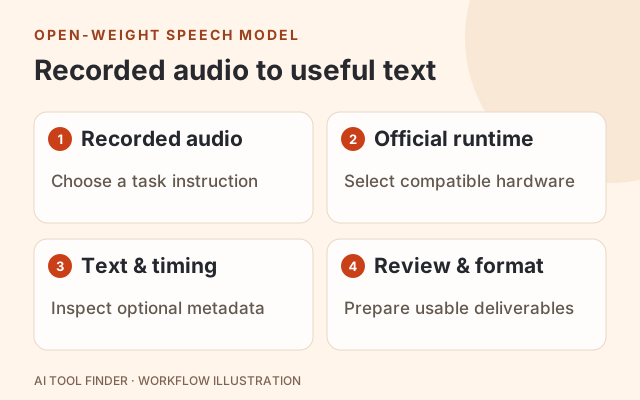
NVIDIA Nemotron 3.5 Transcribe turns recorded audio and a text instruction into transcripts, translations or other text responses. The official model card covers 40 languages, recordings up to one hour, and optional speaker-attributed word timestamps. It is a deployable model, not an online transcription service hosted by AI Tool Finder. Official model card.
Official access and runtime
Start with NVIDIA’s model weights and model card or its research overview. We did not confirm an official hosted browser trial for this exact model in those sources. The supported path documented here is downloading a checkpoint and running a compatible inference environment.
| Route | Official entry | What you need |
|---|---|---|
| Default checkpoint | NVIDIA-Nemotron-3.5-Transcribe-30B-A4B | Compatible GPU resources and the model-card setup |
| vLLM service | Inference setup and prompts | vLLM 0.32.0 with the latest NeMo Speech main branch; the quickstart uses one H100 80 GB |
| In-process use | Transformers instructions | The documented source-install route and suitable hardware |
| Alternative precisions | Official checkpoint list | Choose FP8, NVFP4 or GGUF only with the matching hardware/runtime instructions |
The hardware table includes other supported combinations, so the H100 quickstart is not a universal minimum or a promise that any consumer GPU can run the default checkpoint. Open weights do not eliminate GPU, hosting or electricity costs. Compatibility table · License terms.
Choose the output before running it
| Task | Useful instruction | What to review |
|---|---|---|
| Verbatim transcript | Transcribe the recording verbatim. | Names, numbers, omissions and overlapping speech |
| Readable written form | Transcribe this recording in written form. | Whether cleanup changes the speaker’s meaning |
| Speaker-attributed transcript | Transcribe the recording and label speakers. | Speaker consistency; a label is not a verified real-world identity |
| Translation | Translate the audio into English. | Meaning, proper nouns and language-specific errors |
| Domain vocabulary | Include relevant product names or terminology in the instruction. | Whether the context improves recognition without inserting unsupported words |
These are illustrative task prompts, not transcripts generated for this page. NVIDIA documents instruction-driven transcription, translation, contextual vocabulary and speaker attribution. Consult the prompt guide for supported task wording and the language matrix for language-specific coverage.
A practical first-run sequence
- 1
Select a compatible checkpoint
Read the official hardware table and installation instructions before downloading weights. Select the precision/runtime combination for the machine you actually have.
- 2
Set up the documented environment
For the vLLM path, use the versions and NeMo Speech plugin in the model card. The quickstart includes model-download, server and request examples; do not copy a generic text-only vLLM command for this speech model.
- 3
Start with a short recording
Use a recording you are allowed to process and a simple transcription instruction. The model card lists WAV, FLAC, MP3 and OGG among decodable inputs and uses 16 kHz single-channel preprocessing.
- 4
Review text before scaling
Compare names, numbers, speaker turns and omissions against the audio. Inspect runtime errors and resource use before attempting a full hour or a batch.
- 5
Enable timestamps deliberately
For word timestamps, follow the documented vLLM timestamp configuration. The current quickstart requires the V1 model runner; ordinary text output alone does not establish that timestamp capture is enabled.
Full official quickstart · Input requirements · Timestamp configuration.
This page does not install a server, upload your audio or quote an inference price. The linked configuration is version-specific; use the model card’s full environment setup and request example together.
Limits that affect the decision
Recorded audio, not live captions
Treat this as a full-recording workflow. The model’s internal 30-second encoder chunks are not a low-latency streaming promise. Input and chunking specification.
Length and context
The model card states training on recordings up to one hour and a 65,536-token maximum training context. It does not guarantee longer-input behavior. Documented limits.
Language support is task-specific
The 40-language count does not mean every task and language has identical quality. Check the matrix and evaluate representative recordings. Language coverage.
Privacy follows deployment
Downloading weights is not proof that audio stays local. Your runtime, storage and any external service determine where recordings go and how long they remain. Review that setup before processing sensitive audio.
We have not measured speed, accuracy, GPU memory use or cost. NVIDIA’s published benchmark results describe its evaluation settings; they are not performance guarantees for your hardware.
From speaker timestamps to SRT or VTT
The default output is text. With timestamp capture enabled, the documented vLLM response can also include a ctc_timestamps object with word text, start/end times, speaker tags, diarization segments and alignment information. That structured response is not by itself a finished SRT or VTT subtitle file. Official output specification.
For subtitles, turn the timings into readable cues, choose line breaks and cue lengths, then open the exported file in the target editor or player. Validate speaker changes and timing drift. Our SRT/VTT and speaker-label guide explains what to inspect in the delivered file.
If you only need “who spoke when,” compare Nemotron 3 Diarization and the speaker diarization shortlist. Transcribe adds words and instruction-driven outputs; these are related but distinct tasks.
Frequently asked questions
Is there a Nemotron transcriber on this page?
No. AI Tool Finder provides the product and setup guide. Audio processing requires the external runtime you choose; this page has no upload or transcription backend.
Can it produce speaker labels and timestamps?
The official model card documents speaker-attributed transcription and optional word timestamps. Timestamp capture must be configured in the supported vLLM path; check the response rather than assuming every request includes it.
Does it directly export SRT or VTT?
The documented model output is text with optional timestamp metadata. A subtitle file requires a conversion and validation step, or an application that implements that export.
Is it the same as Nemotron 3 Diarization or Bolt E4B?
No. Diarization focuses on speaker activity; Bolt E4B is a separate language-model product. Nemotron 3.5 Transcribe is the speech model covered here.
Is using it free?
The model weights are available under the linked license, but running them can require paid GPU or hosting resources. No hosted free allowance or per-hour inference price was verified for this listing.
Documentation checked October 29, 2026. No model download, GPU job, audio upload, inference call or subtitle export was performed for this listing. Cost and measured performance remain unverified.