Your assistant. Your Suno account.
Suno makes music from prompts and other supported inputs. Its official MCP Beta lets a compatible AI assistant use your Suno account for music workflows. Connect to https://api.suno.com/mcp and authorize through Suno sign-in; no API key is required. Beta eligibility includes Free accounts, but generation still uses your account’s credits. Official setup · MCP Beta FAQ.
Beta access and supported clients
Suno’s official MCP page lists Claude, ChatGPT, Gemini, Claude Code and Cursor, with setup directions for each. Other clients depend on MCP compatibility. The assistant’s own plan, connector permissions and organization settings can impose separate requirements. Supported-client instructions.
The FAQ notes that Suno may not appear in a client’s connector directory. Adding it as a custom connector is a documented option. Do not confuse the absence of a directory listing with a need to install an unofficial proxy. Official FAQ.
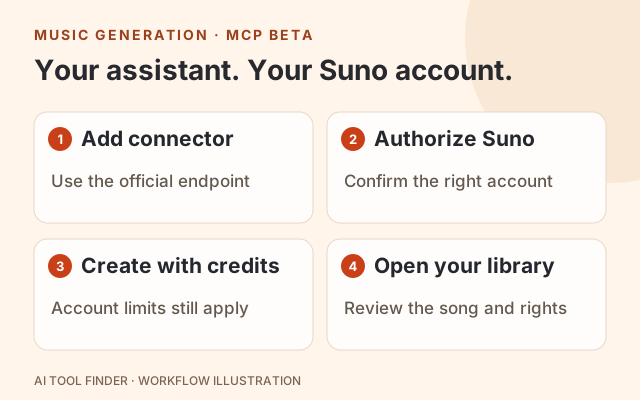
Connect the official Suno MCP server
- 1
Check both accounts
Sign in to Suno and confirm your available credits. Check that the AI client lets your account add a custom remote MCP connector.
- 2
Add the official endpoint
Follow your client’s current custom-connector flow, name it Suno and use https://api.suno.com/mcp. The endpoint is a protocol URL, not a browser music generator.
- 3
Authorize through Suno
Connect, review the authorization screen and approve access to the intended Suno account. Suno’s official route uses OAuth; you do not need an API key or exported browser cookies.
- 4
Make a specific music request
Ask for the kind of song or edit you want, with length, style and lyrics where relevant. Generation consumes account credits. Review what the assistant is about to do.
- 5
Find the result in Suno
The official FAQ says generated songs appear in your Suno library. Playback, downloads and commercial-use rights depend on your plan and the relevant song’s terms.
Official per-client connection instructions · Account, credits and library behavior. Client menu names can change; use the current vendor instructions if yours differ.
CLI and Cursor examples
For Claude Code, Suno publishes this remote HTTP connection command. After adding it, use /mcp to complete sign-in:
claude mcp add --transport http suno https://api.suno.com/mcpFor Cursor, the official page shows this MCP configuration:
{
  "mcpServers": {
    "suno": {
      "url": "https://api.suno.com/mcp"
    }
  }
}
The JSON registers the endpoint; authorization still has to succeed in the client. These examples are copied in meaning from Suno’s setup guide and were not connected to a user account for this article.
For Claude, ChatGPT and Gemini, follow the visual client-specific steps on that same page. If a custom connector option is unavailable, check the client’s plan and workspace permissions before changing Suno settings.
Credits, downloads and plan boundaries
| Suno plan | Listed price / billing | Credits | Song downloads |
|---|---|---|---|
| Free | $0 | 50 per day | No monthly song downloads |
| Pro | $8/month equivalent, billed annually | 2,500 per month | 20 per month |
| Premier | $24/month equivalent, billed annually | 10,000 per month | 60 per month |
These are the prices and allowances displayed on Suno’s pricing page, checked October 29, 2026. Paid prices above are the annual-billing option, not a claim that monthly billing costs the same. Taxes and additional purchases can change the total.
Free has no commercial rights, add-on credit purchases or stem separation. Pro and Premier list commercial-use rights subject to the terms, additional-credit purchases and different editing/stem features. Paid subscriptions do not mean unlimited generation or downloads. Current feature and rights comparison.
The MCP FAQ says generation consumes the connected account’s credits; it does not publish one universal credit cost for every MCP operation. Check the operation and remaining allowance in Suno. Subscription credits do not roll over, while purchased top-up credits have different conditions, including an active-subscription requirement. MCP credit behavior · Credit terms.
Official MCP versus community wrappers
| Check | Official Suno MCP Beta | Community proxy or wrapper |
|---|---|---|
| Endpoint | https://api.suno.com/mcp | Varies; inspect maintainer and upstream service |
| Authorization | Suno sign-in and OAuth | May use other credentials or session mechanisms |
| Account usage | Your Suno plan and credits | Do not assume official allowances or support |
| What the listing establishes | Suno’s documented connector | A similar package name does not establish Suno endorsement |
Use the endpoint linked by Suno itself. An instruction to export session cookies or give a third party your password is not the OAuth setup described by Suno. A personal connector also does not, by itself, establish permission to resell access through a multi-user application.
The official page describes generation, extension, covers, mashups, uploads and voice-related workflows. Availability of each action can still depend on your account and plan. For a wider choice of music products, see the AI music generator guide. For MCP context, see MCP servers and connection patterns.
Frequently asked questions
Do I need Suno Pro for MCP Beta?
Suno’s FAQ says MCP works with all plans, including Free. Beta access, the AI client’s connector eligibility and your available Suno credits still apply.
Does the connector provide free unlimited music?
No. Music generation uses your Suno credits. The Free plan has a daily allowance and no monthly song downloads; paid plans have their own limits.
Where do songs created through MCP appear?
Suno says they appear in your Suno library. A successful connection alone does not mean a song was generated or that your plan includes downloading it.
Is an API key required?
No API key is required for Suno’s official OAuth connection. Use the endpoint from suno.com/mcp and complete sign-in through the supported client.
Why can’t I find Suno in the connector directory?
The official FAQ says the directory listing may be absent during Beta. Use the custom-connector instructions; if your account still cannot connect, check the official early-access route and client restrictions.
Based on each tool's official docs, pricing and terms as of October 29, 2026. We haven't run the same input through each tool, so try your own file before you pay.