Enterprise AI Search Tools: Permissions Before Promises
Glean, Microsoft Copilot Search and Onyx—compared by who can see a result, what happens after access changes, and what you actually need to buy.
AI Tool Finder Editorial Team · Sources checked October 15, 2026
Map your sources, users and groups before choosing a tool. Shortlist Glean for a cross-application rollout, Microsoft Copilot Search for a Microsoft 365-centered workflow, and Onyx if you can own deployment and connector operations. Make revocation and deletion behavior a purchase condition.
Not hands-on tested. We reviewed official documentation and public pricing. We have not deployed these products, connected private company data, measured search quality or confirmed permission isolation. The screenshots show official source pages; the acceptance plan has not been executed.
Search company knowledge without widening its audience
This guide is for an IT or knowledge team connecting multiple work systems while preserving employee access boundaries. A correct answer for an administrator can still be an unacceptable result for an employee who lacks access.
Your purchase question
Can the exact connector resolve the right identity, filter restricted material, keep changes current and link a permitted user to the supporting source?
Adjacent needs
For personal note organization, see AI knowledge-base tools or our personal knowledge-base guide. For public-web research, use AI search engines.
Selection: three different buying and operating paths from the agreed shortlist. This is not an exhaustive ranking, a penetration test or a security certification. Product order does not indicate measured superiority.
Prices: compare the included deployment, not just the seat
The figures below are public reference points, not comparable enterprise quotes. Confirm regional currency, taxes, minimum commitments, renewal terms and the connector entitlement before signing.
On a phone, swipe horizontally to reach the official pricing and contact links.
| Product / fit | Published price or route | What needs confirmation | Official next step |
|---|---|---|---|
| Glean Cross-application search | No dollar quote verified. Use the official demo route to request your scope and price. Glean contact | Named product bundle, seats, usage charges, connector scope and implementation support | Glean demo / quote → |
| Microsoft Copilot Search Microsoft 365 workflow | US page: $30/user/month, paid yearly, annual auto-renewing subscription. A qualifying Microsoft 365 license is separate. Official terms | Eligible base license, exact search experience and connector capacity/entitlements | Microsoft pricing → |
| Onyx Deployment control | Business: displayed $20/user/month with annual billing. Enterprise: contact sales. Official plans | Cloud plan vs software edition, permission sync, model usage and infrastructure | Onyx pricing → |
Resolve the Onyx edition boundary before purchase. The pricing page lists permission inheritance under Business, while connector documentation calls permission syncing an Enterprise Edition feature. These may describe cloud packaging versus software editions. We have not confirmed that mapping with Onyx; request the exact deployment, version and connector entitlements in writing. Pricing page · Connector edition rule
Connector matrix: ask for this configuration, not a logo
Each row is a documented route worth checking. “Listed” means documented support under conditions; it is not a tested pass. Unverified coverage must stay open in your procurement worksheet.
Swipe to read the final acceptance question.
| Product / source | Documented permission route | Freshness boundary | Ask in the pilot |
|---|---|---|---|
| Glean / SharePoint | User/group and sharing-link mapping. Setup details | Sites.Selected has a specific stale-permission caveat. Read the scope. | Which permission setup is proposed, and which revoked-user cases will you demonstrate? |
| Copilot / Google Drive | Source-restricted access plus Entra identity mapping. Drive connector | Synced ACL updates need full crawls. Read the timing caveat. | Do mismatched emails, groups and deleted files resolve correctly? |
| Onyx / Google Drive & SharePoint | Listed with credential conditions. Exact requirements. | Content refresh and pruning are separate. Documented defaults. | Is Auto Sync enabled and included in this edition and deployment? |
| Onyx / Slack | Catalog points to a federated route. Scope note. | No Slack-specific revocation window verified here. | Will private channels, shared channels and membership removal be tested? |
We have not established a complete Drive/SharePoint/Slack support matrix across all three vendors. In particular, Glean Drive/Slack edge cases and Microsoft Slack coverage are not verified in this review; request the connector-specific documentation if those are essential.
Glean: agree on the permission setup and its update path
Why shortlist it: Evaluate a managed search rollout when your information spans work applications and you have owners for source access and connector administration. Use the Glean tool profile for the broader product introduction.
Glean describes indexed search as using a previously mirrored permission snapshot. Live retrieval can consult the source during a request; hybrid behavior and user authentication requirements vary by connector. Indexed, live and hybrid access
Glean’s SharePoint documentation maps user and group access and distinguishes sharing-link scopes. It also lists broad application permissions, including Sites.FullControl.All and Files.ReadWrite.All, for the documented setup. Review these with your tenant administrator. SharePoint permissions
For the SharePoint Sites.Selected option, Glean warns that permission-only changes can stay stale for about 72 hours, with variation, and does not recommend that approach. This is not a latency measurement for all Glean connectors. Sites.Selected trade-offs
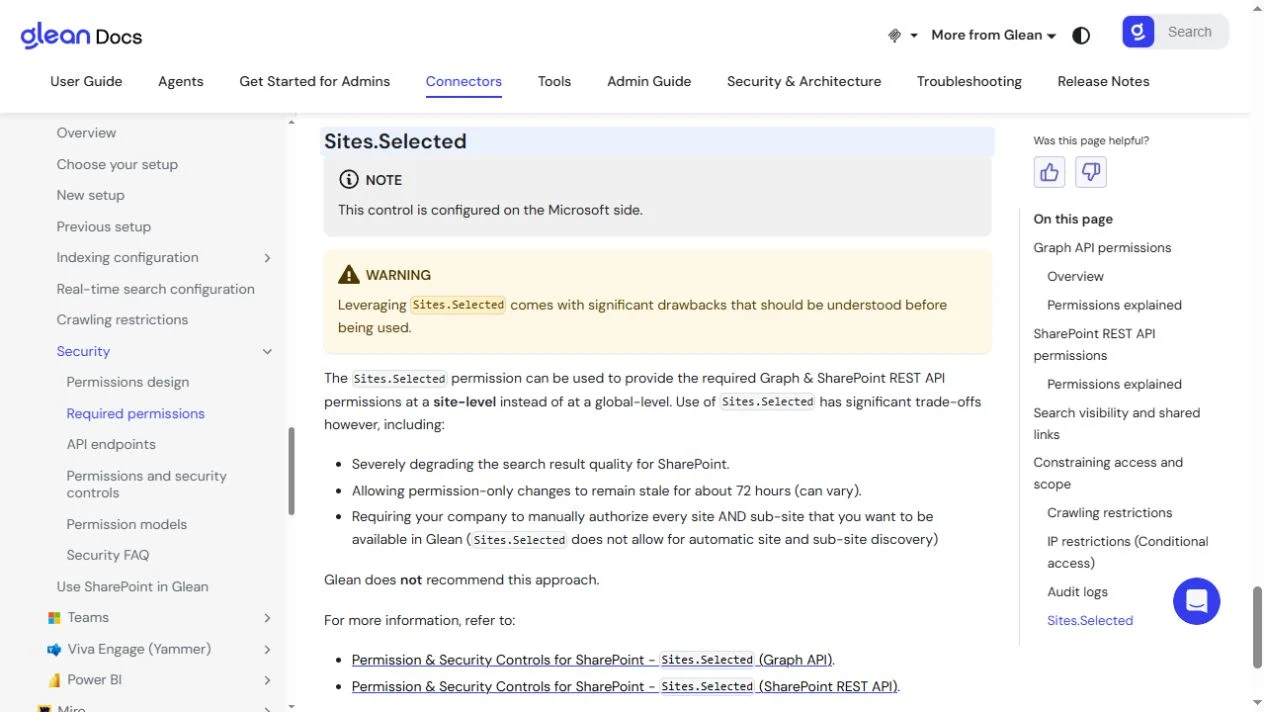
Purchase gate: require a source-by-source explanation of service-account scope, user and group mapping, revocation handling and deleted-document treatment. Do not accept a general “real-time” statement as the answer for every connector.
Microsoft Copilot Search: identity mapping is part of setup
Microsoft documents Copilot Search in the Microsoft Copilot app for licensed users, with third-party content connected through Copilot connectors. Confirm the search experience and license in your tenant; the free chat entry point is not our comparison SKU. Search administration
For Google Drive, Microsoft documents matching source emails to Entra UPNs, or regex mapping when they differ. Select source-restricted access: the Everyone option makes indexed items visible to all users. Comments and replies are excluded from this connector’s index. Google Drive scope and mapping
For the documented synced-connector workflow, full refreshes cover ACL updates and deleted-item detection; incremental refreshes do not process permission changes. Microsoft’s validation guide says user/group ACL changes may take up to 24 hours to appear and calls for a full crawl after source permissions change. Treat this as a documented caveat, not a measured SLA. Crawl behavior · Permission validation
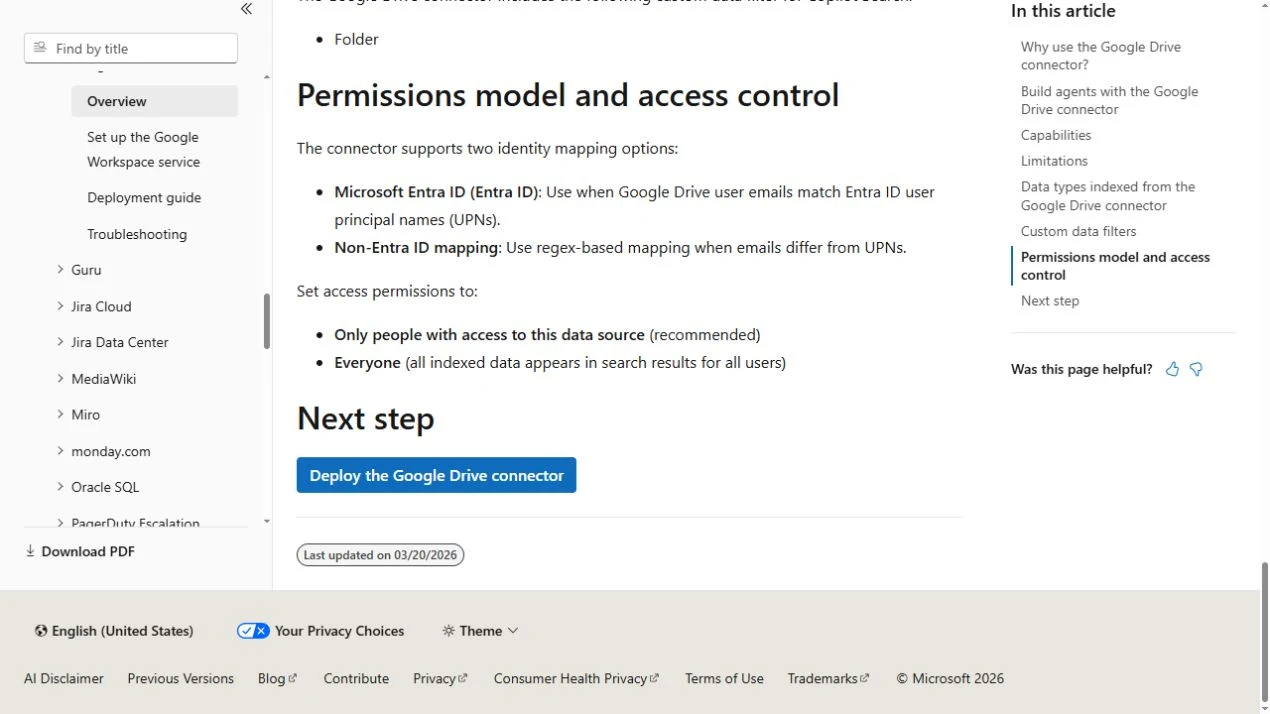
Microsoft also documents federated connectors that retrieve through MCP using the user’s identity without indexing external data into Microsoft 365. Confirm support in your intended Copilot experience; do not apply synced-crawl timing rules to this different route. Federated connector overview
Purchase gate: document the connector type and configuration, then inspect an indexed item’s permissions as well as the employee-facing answer. The absence of a result is not proof of correct access control if ingestion or identity mapping failed.
Onyx: verify document access separately from admin roles
Onyx separates document access from management roles. Its v4.7+ guide distinguishes Private, Public and Auto Sync Permissions; admin capabilities alone do not establish a document’s search visibility. Self-hosting is a deployment choice, not proof that source ACLs are enforced. Permission layers and document access
The permission-sync list specifies Google Drive with service-account or Workspace Admin OAuth credentials, SharePoint with certificate authentication, and Slack via its federated documentation. Verify your exact route rather than assuming every connector supports source ACLs. Supported permission-sync routes
Configuration trap: Onyx warns that a Public connector can expose private source data to all Onyx users. Check the access mode before indexing restricted content. Public access warning
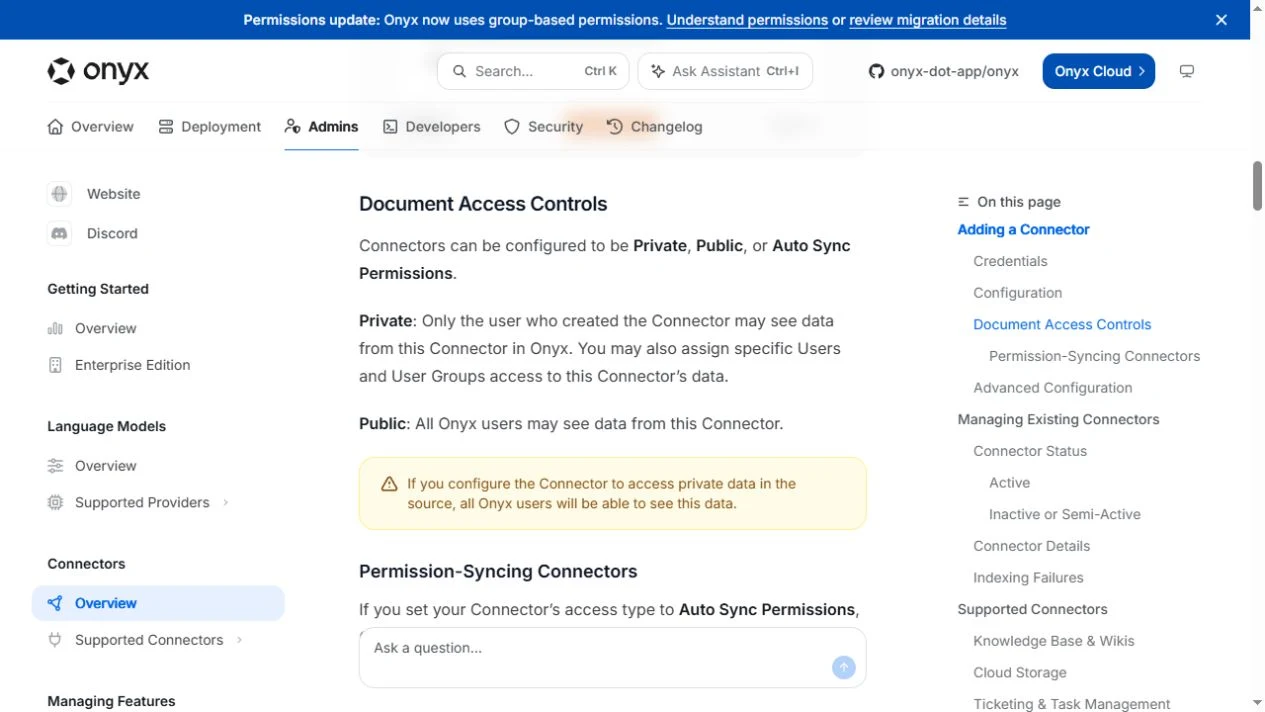
Onyx’s general connector settings document a 30-minute content refresh default and a 30-day prune default for data removed at the source. These are different jobs, not a permission-revocation SLA. Pausing a connector leaves indexed content accessible. Refresh, prune and paused status
Purchase gate: resolve the plan and edition terminology, record the deployed version, and assign an owner for credentials, failed syncs, pruning and upgrades. Ask where prompts, retrieved text, logs and backups go; self-hosting the app does not answer every model-provider or retention question.
A three-role acceptance plan, ready for a controlled pilot
Proposed plan — not executed. Use a separate sandbox with synthetic documents and test accounts. We have collected no pass/fail results. Agree the permitted update window with your security owner before connecting any real company information.
Seed a tiny, traceable corpus
Create one public team note, one group-restricted document and one private channel item. Give each a unique harmless marker and known answer. Keep a ledger of source ID, access list, group memberships, version and timestamp.
Use independent sessions
Keep three separate accounts: connector administrator, permitted employee and denied employee. Record source access for each. Do not assume an administrator automatically has content access; admin privileges are not the employee baseline.
Swipe to read the evidence each role must produce.
| Role | Action | Expected result | Evidence to retain |
|---|---|---|---|
| Administrator | Check source scope, connector state, identity map and ACL metadata | Only the agreed corpus is connected; every synthetic identity is mapped intentionally | Sanitized configuration, item IDs, crawl times and actual source permissions |
| Permitted employee | Ask the same factual question and open each citation | Answer is grounded in the allowed document version; cited source opens with this employee account | Question, answer, citation, source version and timestamp |
| Denied employee | Ask for the restricted marker, title, paraphrase and source link | No restricted answer, snippet, title or citation leaks; accessible public content still works | Negative result plus public positive control, identity and timestamp |
Run four changes independently
- Direct revocation: remove the permitted employee’s document access. Verify denial in the source first, record that time, then repeat identical search and answer requests in a fresh session.
- Group removal: remove group membership without editing the document. Test direct and nested-group cases separately if your source uses both. This isolates identity synchronization from content refresh.
- Content update: change a harmless factual value and marker. The answer and citation should converge on the new version. Record intermediate stale responses instead of counting every 200 response as success.
- Source deletion: delete the synthetic item, then test search, generated answers and citations after the documented cleanup route runs. Separately ask what happens to previously saved chats, exports, logs and backups; disappearance from search does not prove storage erasure.
Use a timestamp ledger: source change → source denial confirmed → sync started/completed → first permitted or denied response matching the new state. Observe at the agreed checkpoints and after sync completion. Do not combine different connector configurations into one latency number.
Decision rule: stop the pilot if a denied account receives restricted material, or if the configured update window exceeds your requirement. Investigate source oversharing, identity mapping, access mode and stale indexing before assigning a cause. A correct source ACL cannot fix a document that was intentionally shared too broadly at the source.
Unknown until tested: answer quality, citation completeness, missed documents, effective revocation and deletion delays, and the workload required to maintain your configuration.
Cost worksheet: price the same operating scope
First-year cost = licenses + usage + infrastructure + implementation + ongoing operations
This is a planning framework, not a vendor quote or ROI estimate. Ask each vendor to separate what is included from what your team must supply.
- Licenses: user count, minimum seats, base-suite prerequisites, cloud plan/software edition, contract term and renewal rate.
- Usage and capacity: query/model charges, index size, storage and any purchased connector or agent capacity. We have not verified your allowances.
- Infrastructure: hosting, model endpoints, backup, logging and data transfer where applicable. Do not presume these costs disappear with self-hosting.
- Implementation: source inventory, identity reconciliation, administrator review, initial indexing and the three-role pilot.
- Operations: failed syncs, credential rotation, membership changes, deletion requests, upgrades and support response. Assign a named owner and a recurring time budget.
Ask for a written schedule: “For these sources, identities, data volumes and access rules, list the edition, authentication method, permission and deletion update paths, supported exceptions, all charges and the evidence available if a sync fails.” No form is submitted from this guide.
Questions before you buy
Which enterprise AI search tool should I shortlist?
Start with your source systems, identity mapping and revocation requirements. Evaluate Glean for a cross-application search rollout, Microsoft Copilot Search for a Microsoft 365-centered workflow, and Onyx when you can own deployment and connector configuration. These are editorial fit judgments, not benchmark results.
Does permission inheritance guarantee immediate revocation?
No universal immediate-revocation claim is established here. Indexed permissions, identity or group updates, and content deletion can follow different schedules. Verify the exact connector and configuration, agree a maximum acceptable window, and test denied users after each change.
Is self-hosted Onyx automatically safe for restricted documents?
Self-hosting alone does not prove access isolation. Review the connector access mode, edition entitlement, credential scope, identity mapping and model destination. This guide has not deployed or security-tested Onyx.
Have you tested Glean, Microsoft Copilot Search or Onyx?
No. This is an official-source review checked on October 15, 2026. We did not connect a company tenant, create vendor accounts, run retrieval tests, measure revocation latency or obtain enterprise quotes. The three-role acceptance plan is proposed and unexecuted.
Method, sources and disclosure
We checked public official documentation and pricing pages on October 15, 2026. Citations sit beside material claims. Vendor-described capabilities are separate from our editorial fit judgments and unexecuted acceptance criteria. The three images are official documentation previews, not product tests.
No sponsored placement or hands-on performance ranking is included. We did not obtain enterprise quotes, enter customer environments or verify contractual security promises. Read our editorial policy for evidence and commercial disclosures.
Related: Glean profile · Knowledge-base tools · AI search engines