Best AI Code Review Tools 2026: Pull Requests and Static Analysis
Compare CodeRabbit, Greptile, Qodo and GitHub Copilot code review when the job is reviewing a pull request rather than writing one. The deciding details are how much repository context the reviewer gets, where the code is processed, and how a finding reaches the developer who has to act on it.
AI Tool Finder Editorial Team · Sources checked September 17, 2026
Direct answer: choose by where the review must run
Shortlist Greptile for a free per-developer entry with repository-wide context, CodeRabbit for a mature review platform with published rate limits and a self-hosting option, Qodo when the review must run in your own environment with your own model keys, and GitHub Copilot when the review belongs inside GitHub itself. The first three are dedicated review products; the fourth is a feature of a coding assistant, and its review capability starts above the free tier.
This is a documentation-verification guide. Plan names, prices and documented limits below are quoted from each vendor's own pricing page on the check date. We have not run the same pull request through all four tools, so no review-quality or defect-detection ranking is claimed.
Four candidates were kept because they represent four different review architectures: a dedicated review platform, a context-heavy reviewer with a free entry tier, a deployable review platform with bring-your-own-model support, and a review feature inside a coding assistant. Tools that only lint or format code, without reviewing a pull request, were left out.
Each card links to the vendor's own pricing page. No review output is reproduced. Nothing here is a defect-detection ranking.
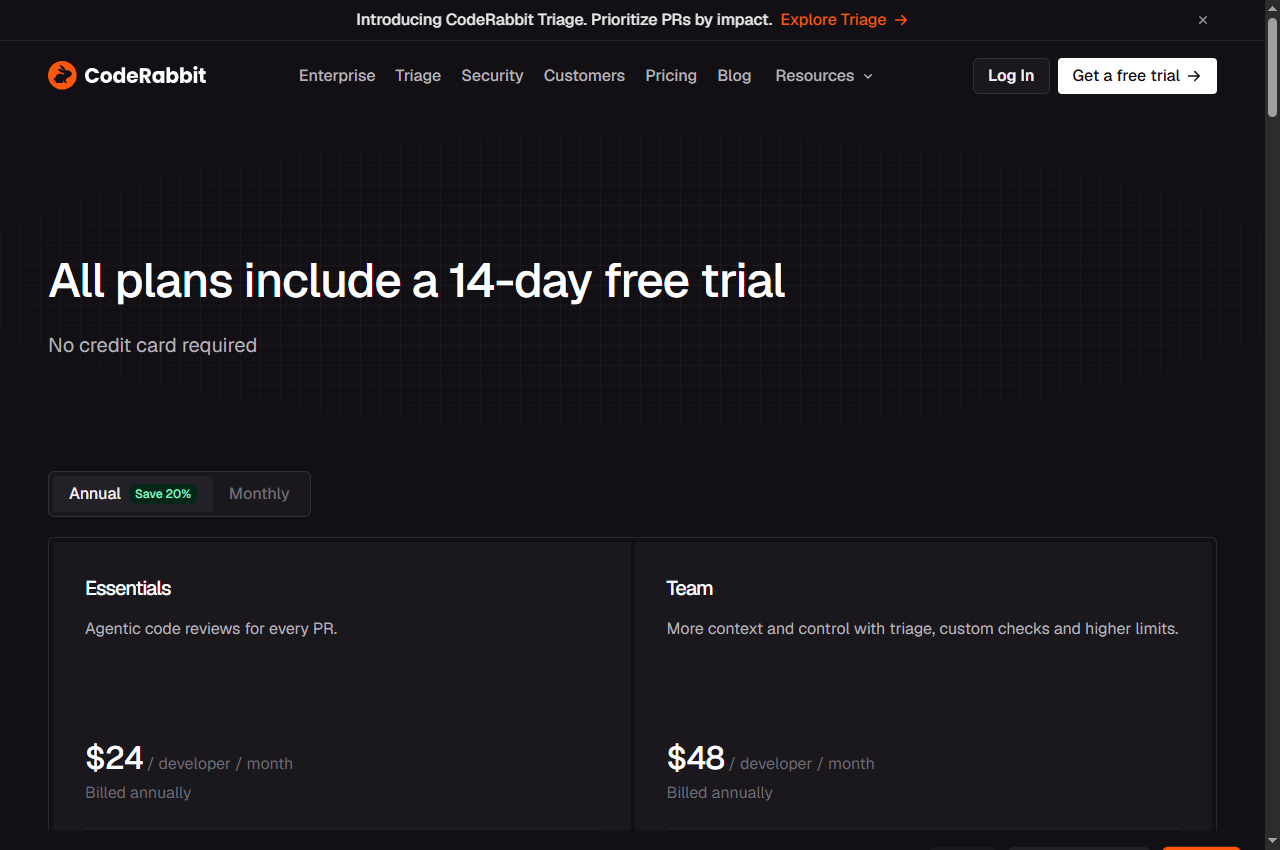
Official page captured 22 September 2026. Pricing and interface may change. Open the current official page. This is a source preview, not a product test result.
Plans run from $24 per developer per month billed annually with a 14-day free trial and a published rate limit per developer per hour.
Best for
Teams that want a review bot on every pull request
Check first
The published rate limit of reviews per developer per hour
Limitations
Every plan is a per-developer subscription with a 14-day trial; the published rate limit is five pull request reviews per developer per hour on the entry tier.
The rate limit is the detail most teams miss: reviews per developer per hour is published per tier, and a busy repository can hit it. Check that figure against your merge cadence before choosing a tier.
Starter is free with unlimited repositories, 50 credits per month and one active developer; Pro is $30 per seat per month.
Best for
A single developer evaluating AI review on real pull requests
Check first
That the free tier covers one active developer and 50 credits
Limitations
The free Starter tier is documented as unlimited repositories with 50 credits per month for one active developer, where one credit is one standard review and three credits are one deeper review.
This is the only standing free tier in the shortlist, and it is a genuine one rather than a trial. The credit conversion is the part to plan around: a deeper review costs three times a standard one, so fifty credits is not fifty reviews.
The distinguishing feature is bring-your-own-LLM-keys on the Enterprise tier, alongside single-tenant SaaS or on-premises deployment. That is the combination a team needs when code cannot leave the environment.
The value here is that review happens where the pull request already is, with no third-party app to install. The limitation is that review is a paid feature, and usage is metered in AI credits rather than being unlimited.
Quick comparison table
Tool
Best for
Access and cost model
Unit to verify
Open tool
CodeRabbit
Teams that want a review bot on every pull request
Essentials $24/developer/month billed annually; Team $48; Advanced $72; Enterprise custom with self-hosting
Rate limit, repository analysis scope and self-hosting
A per-developer subscription, a credit pool, a per-seat credit grant and a bundled assistant plan are different meters. Convert each to the cost of reviewing your team's monthly pull request volume.
Four AI code review options compared
CodeRabbit: dedicated review platform
CodeRabbit's pricing page lists Essentials at $24 per developer per month billed annually, Team at $48 and Advanced at $72, with Enterprise priced on request and a 14-day free trial on all plans. The comparison table publishes rate limits of five pull request reviews per developer per hour on Essentials, eight on Team, ten on Advanced and twelve on Enterprise.
The tiers differ by analysis depth and control rather than by basic function. Team adds multi-repo analysis, custom pre-merge checks, finishing touches such as unit tests and merge-conflict resolution, and post-merge actions. Advanced adds blast-radius and architectural-impact analysis and a security review of every pull request.
Enterprise is where deployment and data handling change: it lists custom role-based access control, SSO and audit logging, API access, a self-hosting option, multi-organisation support and an EU SaaS deployment, plus the ability to pay through cloud marketplaces. For teams with data-residency or self-hosting requirements, that is the tier that matters.
When to skip: if your review volume per developer exceeds the published hourly rate limit on the tier you are considering, or if you need self-hosting and cannot use the Enterprise tier.
Greptile's pricing page lists a Starter tier described as free and best for individual developers, including unlimited repositories, 50 credits per month and one active developer. The page states that one credit equals one standard review and three credits equal one deeper review.
Pro is $30 per seat per month with unlimited repositories, 50 credits included per seat, additional credits at $1 each, unlimited users, custom rules and unlimited external app connections. Enterprise is custom-priced and adds the option to self-host in your own infrastructure, security and compliance documentation, SSO and SAML, GitHub Enterprise support and a dedicated support channel.
The self-hosting option appearing at the Enterprise tier rather than lower down is the practical constraint for regulated teams. For everyone else, the free Starter tier is enough to evaluate whether the repository-wide context produces findings worth acting on before paying per seat.
When to skip: if you need self-hosting on a lower tier, or if your team has more than one active developer — the free tier covers one.
Qodo's pricing page lists a Pro Team plan with credits priced at $0.012 each, pooled across the team, switchable packs and no annual commitment, alongside a 14-day free trial with no credit card. It publishes an indicative conversion where 2,500 credits is approximately eighteen reviews per month and 20,000 credits approximately one hundred and forty-four.
The plan includes agentic pull request review, a rules system without a stated limit, Git and IDE integrations, pre-PR review skills and a dashboard with analytics. Enterprise adds SSO and SAML, audit logs, a governance analytics dashboard, advanced self-learning, bring-your-own-LLM keys, single-tenant SaaS or on-premises deployment and priority support.
The published conversion from credits to reviews is unusually useful for planning, because it lets you estimate the monthly cost against your actual pull request volume before committing. Note that the per-credit rate is fixed while the number of credits a review consumes may vary with the size of the change.
When to skip: if you need a standing free tier for ongoing use, or if you require self-hosting but cannot use the Enterprise tier.
GitHub's Copilot plans page lists Free at $0 with 2,000 completions per month, access to selected models and the Copilot CLI. The feature table marks pull request reviews in GitHub and file diff reviews in code editors as not included on Free and included from Pro upward.
Pro is $10 per user per month and adds access to the cloud agent and code review, unlimited code completion, access to third-party agents, model selection and a monthly credit allowance. Pro+ is $39 per month with premium model access and a larger credit allowance, and Max is $100 per month with priority access and a larger allowance again.
Review usage consumes AI credits rather than being unlimited, and the page notes that usage varies by model. That means the cost of reviewing a large pull request with a premium model differs from reviewing a small one with a cheaper model, and the credit allowance per tier is the figure to plan against.
When to skip: if you need code review without a paid plan, or if your workflow does not run on GitHub, since the review features are tied to the platform.
Start with where the code may be processed. If the repository cannot be sent to a third-party service, the shortlist collapses to tools offering self-hosting, on-premises deployment or bring-your-own-model keys, and those options usually sit on the highest tier. Establishing that constraint first avoids comparing plans you cannot use.
Then check how much context the reviewer receives. A reviewer that sees only the diff will comment on style and obvious errors; one that sees the repository can flag a change that breaks a caller elsewhere. The pricing pages describe this differently, so look for repository analysis, multi-repo analysis or blast-radius features.
Finally, look at the rate limit and the metering. A published limit of reviews per developer per hour, or a credit that converts to a fixed number of reviews, determines whether the tool keeps up with your merge cadence. A review that arrives after the merge has limited value.
A short verification you can run
Use a pull request that has already been merged and whose real defects you already know. This is a proposed verification design, not a completed comparative test.
Pick a change with a known bug. Choose a merged pull request where a defect was later found, so the reviewer has something real to catch.
Count the findings, not the comments. Distinguish actionable findings from stylistic noise; a high comment count is not evidence of value.
Check for false positives. A reviewer that flags correct code costs reviewer time and erodes trust faster than one that misses something.
Time the review. Note how long it takes to appear relative to your merge cadence.
Confirm where the code was processed. Verify the deployment and data-handling terms against your own requirements before enabling it on a real repository.
Pricing and per-developer limits
CodeRabbit runs from $24 per developer per month billed annually to $72 on Advanced, with Enterprise on request and a 14-day trial on every plan. Greptile's Starter tier is free with 50 credits per month for one active developer, and Pro is $30 per seat per month with 50 credits included per seat and additional credits at $1.
Qodo's entry is a 14-day trial, after which credits are pooled at $0.012 each, with a published conversion of 2,500 credits to roughly eighteen reviews per month. GitHub Copilot's free plan includes 2,000 completions but not code review; Pro is $10 per user per month and adds pull request reviews, with usage metered in AI credits.
Convert each to the cost of reviewing your team's monthly pull request volume, including the reviews you would re-run after a change. The per-developer price and the per-review cost are different numbers, and only one of them matches how the work actually arrives.
Limits and when to skip a tool
Skip a tool when it cannot meet your deployment or data-handling requirements, when its published rate limit is below your merge cadence, when the free entry is a short trial rather than a standing plan, or when code review is not included on the tier you are pricing. Each of these is documented rather than a matter of degree.
Do not treat a review tool as a substitute for tests. An AI reviewer examines a change; it does not execute it. The two are complementary, and a repository with weak test coverage will still be weak after adding a reviewer.
Re-verify before committing. Review pricing and metering change frequently in this category, and the figures here carry the check date printed on the page.
Build a repeatable acceptance checklist
Before enabling a reviewer on a real repository, confirm where the code is processed and what is retained, agree with the team what counts as an actionable finding, and decide which comment categories you will act on. A reviewer whose output nobody reads is worse than none, because it adds noise to every pull request.
Keep a small set of merged pull requests with known defects as a reference set. Re-run them when you change model, tier or configuration, so that a change in detection behaviour is visible rather than assumed.
Official pricing pages were checked September 17, 2026. This is a documentation-verification guide. No defect-detection ranking is claimed.
Frequently asked questions
Does AI code review replace human review?
No. It adds a first pass that catches some classes of defect and some style issues before a human looks. The final decision, the architectural judgement and the accountability remain with the team.
Is there a free AI code review tool?
Greptile's Starter tier is free with unlimited repositories and 50 credits per month for one active developer, where a standard review costs one credit and a deeper review costs three. The other tools here offer trials or require a paid plan.
Can AI code review run inside our own infrastructure?
Some options exist, usually on the highest tier. CodeRabbit lists a self-hosting option on Enterprise, Greptile lists self-hosting on Enterprise, and Qodo lists single-tenant SaaS or on-premises deployment with bring-your-own-LLM keys on Enterprise.
Why does the review rate limit matter?
CodeRabbit publishes reviews per developer per hour by tier, from five on Essentials to twelve on Enterprise. If your team merges faster than the limit, reviews arrive late, and a review that appears after the merge has limited value.
Is this a defect-detection ranking?
No. The comparison is built from published pricing and plan documentation. The verification steps are proposed editorial guidance, not a completed comparative test.
Decision models versus PR review products
Jev and the Jev Review integration provide structured decisions and quality feedback. Compare their role with a pull-request review service before choosing a workflow.