Best AI Virtual Staging Tools 2026: Empty Rooms to Listed Photos
Compare Virtual Staging AI, REimagine Home, Apply Design and Interior AI when the job is furnishing an empty room for a listing. The buying unit is the credit and the licence, not the subscription, and the two must be checked separately.
AI Tool Finder Editorial Team · Sources checked September 17, 2026
Direct answer: choose by listing volume and licence
Shortlist Virtual Staging AI for a metered per-photo workflow with a documented commercial photo licence, REimagine Home for a five-design free evaluation before subscribing, Apply Design for per-image pricing on a small number of rooms, and Interior AI when you want design generation and staging inside one subscription. Only one of the four publishes a standing free allowance, so the free tier is an evaluation step rather than a production plan.
This is a documentation-verification guide. Plan names, credit allowances and licence wording below are quoted from each vendor's own pricing page on the check date. We have not staged the same room in all four tools, so no realism ranking or accuracy measurement is claimed.
Four candidates were kept because they cover four different ways of buying staged images: a credit pack with a commercial photo licence, a free evaluation followed by a monthly plan, per-image pricing, and an all-in-one design subscription. Products whose staging pricing could not be read from a public page without an account were left out.
Each card links to the vendor's own pricing page. No staged samples are shown on this page. Nothing here is a realism ranking.
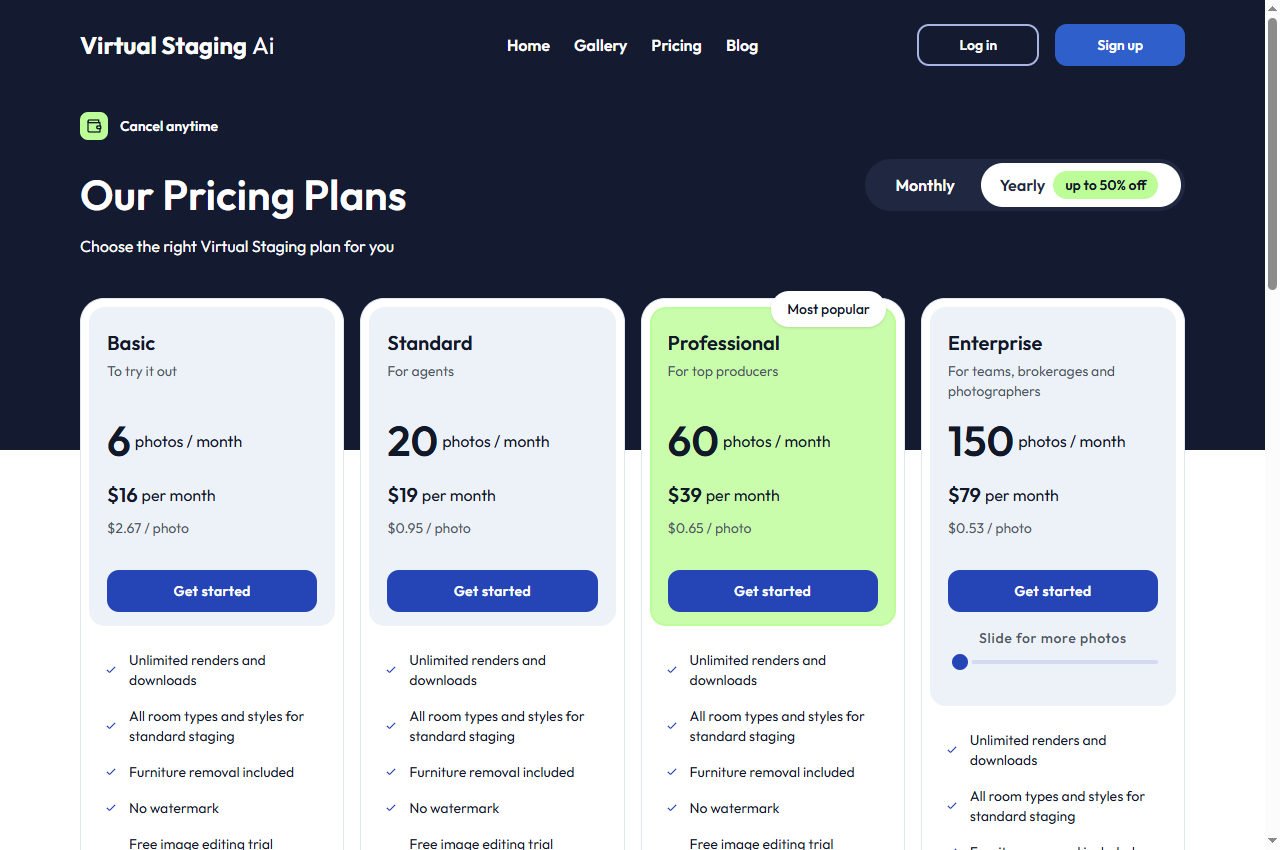
Official page captured 22 September 2026. Pricing and interface may change. Open the current official page. This is a source preview, not a product test result.
The pricing page sells photo credits from $16/month for six photos, with a commercial photo licence, no watermark and a 10-second turnaround on paid tiers.
Best for
Agents staging a known number of listing photos
Check first
That the plan includes a commercial photo licence
Limitations
There is no permanent free plan on the pricing page; the trial allowance is limited and watermarked, and the cheapest tier covers six photos a month.
The commercial photo licence is the line that makes this shortlist usable for real listings. Check it explicitly rather than assuming it, and check the credit-to-photo ratio: one photo credit per generation is stated, but regeneration and editing tools consume differently.
This is the most useful free evaluation in the shortlist because the vendor states the free designs are the same system as the paid ones. That makes it a fair test of output quality rather than a degraded demo.
Per-image pricing is the right shape for an agent who stages a handful of rooms a month, because there is nothing to cancel. The published subscription price is not on the page as checked, so the monthly figure must be confirmed before comparing it with the metered alternatives.
Paid tiers are documented from $29/month billed yearly for 1,000 designs, with virtual staging listed on the $49 tier and a commercial use licence on the entry plan.
The appeal is breadth: the same subscription covers interior redesign, staging, wall colour changes and walkthrough video generation. The catch is that staging is not on the cheapest tier, so the entry price is not the staging price.
Quick comparison table
Tool
Best for
Access and cost model
Unit to verify
Open tool
Virtual Staging AI
Agents staging a known number of listing photos
From $16/month for 6 photos, up to $79/month for 150 photos; add-on photos $0.24 each
Photo credits, design credits and a monthly design count are different meters. Convert each to the cost of one accepted listing photo before comparing subscription prices.
Four AI virtual staging options compared
Virtual Staging AI: metered per-photo staging
The pricing page lists tiers from Basic at $16 per month for six photos through Standard at $19 for twenty, Professional at $39 for sixty and Enterprise at $79 for one hundred and fifty, with an optional add-on at $0.24 per photo. The Basic tier is described at $2.67 per photo, falling to $0.53 per photo at the top tier.
The documented inclusions that matter for a listing are No watermark, Commercial photo license, 10 second turn-around and High-resolution downloads. The comparison table also shows a free trial allowance on several features, marked with watermark, which is an evaluation path rather than a publishing one.
Read the credit rules before planning a catalogue. The page states one photo credit per generation for staging, but separate features carry different costs — for example, a multi-image virtual tour feature is listed at twenty photo credits per generation. Mixing features therefore consumes credits at different rates.
When to skip: if you need a standing free tier for ongoing work. The free allowance is an evaluation with a watermark, not a production plan.
REimagine Home: free evaluation, then monthly credits
The pricing page states that all new users get 5 free designs — same AI, same quality as paid plans. Paid tiers run from Essential at $19 per month for thirty credits through Pro at $36 for two hundred, Advanced at $59 for four hundred and Agency at $119 for nine hundred, with the effective cost per credit falling from $0.63 to $0.13.
The credit rules are documented in unusual detail. One credit covers visualisation or design only; two credits cover visualisation combined with real-product matching; and conversation, idea exploration and refining requirements are stated to consume no credits at all. For a first pass on an empty room, the design-only path is the cheaper one.
The tier differences are about workflow rather than just volume. Essential is described as excluding the conversational flow, real shoppable products, reference photos and high-resolution quality, while Pro and above include them. That means the free five-design evaluation exercises the generation but not the full constraint-handling workflow.
When to skip: if you need batch processing across a whole listing on the cheapest tier, or if the resolution on the entry tier does not meet your platform's requirement.
The Apply Design pricing page states Virtual Staging as low as $7 per image and documents a first image free. It gives credit costs of 1.5 for a 2D image and 2.5 for a 360 image for the one-click staging service, and 1 and 2 credits respectively for the do-it-yourself editor.
Documented inclusions are a 15-minute turnaround, item removal, and revisions — described as on-the-spot for the one-click service and unlimited for the do-it-yourself editor. The revision terms are the part worth reading closely, because a staged photo that needs a second pass changes the effective cost per accepted image.
The page as checked does not publish a monthly subscription price. That is not a defect, but it does mean the cost per accepted image cannot be compared against the subscription tiers on this page alone. Confirm the current monthly figure with the vendor before deciding.
When to skip: if you need a high monthly volume with predictable pricing, or if you cannot confirm the current subscription price from the vendor.
The Interior AI site lists three paid tiers: Pro at $29 per month billed yearly for 1,000 interior designs, Premium at $49 for 5,000 designs, and Ultra at $99 for 25,000 designs. A commercial use licence is listed on the Pro tier, and the Pro tier also lists a lower quality render setting.
Virtual staging appears as a Premium-tier feature, alongside editing, upscaling, wall painting, lighting changes, adding people, walkthrough video generation, adding furniture and VR walkthroughs. That places the staging capability one tier above the entry plan, which changes the effective entry price for a staging workflow.
The tier structure also separates render quality: Pro is described with low quality renders, Premium with medium quality and high realism and lighting, and Ultra with ultra quality and photorealistic interiors. For a listing photo, render quality is a functional requirement rather than a preference, so the tier that meets it should be chosen first.
When to skip: if you only need staging and nothing else, because the staging capability sits above the cheapest tier.
Start with the licence. A staged photo that cannot be published in a real listing is worthless regardless of quality, so confirm the commercial photo licence before comparing credits. One tool here states it explicitly on the pricing page; for the others, confirm it with the vendor.
Then decide the shape of the purchase. If you stage a handful of rooms a month, per-image pricing avoids a subscription. If you stage a fixed volume every month, a credit tier is cheaper per photo. If you also need design concepts or video, an all-in-one plan may cover both jobs, but check that the feature you need is not sitting one tier above the entry price.
Finally, check the revision terms and the turnaround. A staged image that needs a second pass costs twice, and a turnaround measured in hours rather than seconds changes how late in the listing process you can work.
A short verification you can run
Use one empty room you have already photographed and already know the dimensions of. This is a proposed verification design, not a completed comparative test.
Check the licence in writing first. Confirm that the output may be used in a listing and, if relevant, in paid advertising.
Stage the same room at your real output size. Judge the result at full resolution rather than in a thumbnail.
Look for structural change. Check that windows, doors, ceiling lines and fixed features have not moved. A staged image that alters the room is a disclosure problem, not just a quality one.
Test the revision path. Request one change and see what it costs in credits, money and time.
Confirm the delivered file. Check the resolution, the absence of a watermark and the format your listing platform accepts.
Pricing and free-plan limits
Virtual Staging AI is documented from $16 per month for six photos up to $79 for one hundred and fifty, with add-on photos at $0.24 each, and no permanent free plan. REimagine Home gives new users five free designs and then runs from $19 per month for thirty credits to $119 for nine hundred.
Apply Design documents a first free image and per-image credit costs of 1.5 for a 2D image and 2.5 for a 360 image, but does not publish a monthly subscription price on the page as checked. Interior AI publishes no free tier and starts at $29 per month billed yearly for 1,000 designs, with virtual staging on the $49 tier.
Where a vendor publishes a cost per image, use it as the comparison unit. Virtual Staging AI publishes $2.67 per photo at its cheapest tier and $0.53 at its most expensive, and Apply Design publishes a figure as low as $7 per image for a single staged image — different products at different points on the curve, and a subscription is not automatically cheaper for a low volume.
Limits and when to skip a free plan
Skip the free tier when the output carries a watermark, when the licence does not cover publication, when the free allowance is a fixed one-off count rather than a recurring grant, or when the tier that includes staging is above the tier you were pricing. Each of these is documented rather than a matter of degree.
Also check what a credit does not cover. Regeneration, editing, furniture removal and video features are frequently metered differently from a single staging generation, so a headline credit count can overstate how many finished photos it will produce.
Re-verify before you commit. Staging prices and credit rules change often, and the figures here carry the check date printed on the page.
Build a repeatable acceptance checklist
Before publishing a staged photo, check that the room's fixed features are unchanged, that the furniture scale is plausible for the space, that the image is watermark-free, and that the listing carries the disclosure your platform and local rules require. Keep the original empty-room photograph alongside the staged version.
Save one staged image per style that you would accept, and use it as the reference for later batches. A written standard is more reliable than a memory of what looked good last month.
Official pricing pages were checked September 17, 2026. This is a documentation-verification guide. No realism ranking is claimed.
Frequently asked questions
Do AI virtual staging tools include a commercial licence?
Some do and some do not. Virtual Staging AI lists a commercial photo licence among its inclusions, and Interior AI lists a commercial use licence on its entry tier. For the others, confirm the licence with the vendor before using an image in a live listing.
Can I try virtual staging for free?
REimagine Home documents five free designs for new users and states they are the same quality as the paid plans. Apply Design documents a first free image. Virtual Staging AI's free trial allowance is marked with a watermark in its comparison table.
Should I disclose that a listing photo was staged?
Follow the rules that apply where the property is listed and the policy of the platform carrying the image. Staging changes what a photo shows, so disclosure is usually required, and some vendors provide a one-click disclosure option for that reason.
Is per-image pricing cheaper than a subscription?
For low volume, often yes. Virtual Staging AI's cheapest tier works out at $2.67 per photo, and Apply Design publishes a figure as low as $7 per image for a single staged image. A subscription only becomes cheaper once your monthly volume is predictable and sustained.
Is this a realism ranking of staging tools?
No. The comparison is built from published pricing and licence documentation. The verification steps are proposed editorial guidance, not a completed comparative test.