Best AI Podcast Post-Production Tools 2026: Edit to Publish
Compare Descript, Auphonic, Riverside and Adobe Podcast across the whole episode workflow rather than one step of it. Post-production is a sequence — record, cut, clean, level, describe, publish — and the tools differ in which parts of that sequence they cover.
AI Tool Finder Editorial Team · Sources checked September 17, 2026
Direct answer: choose by which step you are missing
Shortlist Riverside when the recording step is the problem, Descript when editing and cleanup should happen in one place, Auphonic when the deliverable must meet a consistent loudness and metadata standard, and Adobe Podcast when a single speech-cleanup pass is the only missing step. No tool here covers the whole sequence well, so identify the weakest step before choosing.
This is a documentation-verification guide. Plan allowances and documented features below are quoted from each vendor's own page on the check date. We have not produced the same episode in all four tools, so no output-quality ranking is claimed.
Four candidates were kept because they cover different stages of one workflow: recording and hosting, text-based editing, automated leveling and delivery, and speech enhancement. Tools that address only one narrow operation, with no place in a recurring episode process, were left out.
The free plan documents 2 hours of multi-track recordings, 720p video and a watermark; Pro adds 4K, no watermark and 15 hours of track downloads.
Best for
Capturing separate tracks remotely, then publishing
Check first
That free recordings carry a watermark and cap at 720p
Limitations
The free plan is documented with two hours of multi-track recordings, up to 720p, a Riverside watermark and no separate-track downloads beyond the allowance.
The distinguishing feature is local multi-track recording: each participant is captured separately, which is what makes later per-speaker cleanup possible. The free plan's two hours and the watermark are the constraints.
Text-based editing with Studio Sound in the same project; the free plan allows 60 media minutes a month at 720p with a watermark.
Best for
Editing an episode by editing its transcript
Check first
The 60-minute monthly media allowance on free
Limitations
The free plan is documented with 60 media minutes per month, 100 one-time AI credits, 720p export and no watermark-free export, with batch export unavailable.
Editing the transcript rather than the waveform is the feature that changes the work, because it removes filler words and false starts faster than a timeline. Check the media-minute allowance before planning a series on the free tier.
Official page captured 22 September 2026. Pricing and interface may change. Open the current official page. This is a source preview, not a product test result.
This is the step most home productions skip: applying the same loudness target and metadata to every episode. It is also the step that most reliably makes a series sound consistent across episodes recorded in different rooms.
Enhance Speech improves voice recordings; the free plan caps files at 30 minutes with one hour per day and branded Studio audiograms.
Best for
Fixing one difficult voice recording before editing
Check first
The 30-minute cap and the branded audiograms on free
Limitations
The free plan caps enhancement at 30 minutes per file and one hour per day, and Studio downloads are limited to two projects a day with podcast branding.
Treat this as a repair step before the edit rather than as an editing environment. It has no timeline and no transcript, so it belongs at the start of the process when one guest's audio is materially worse than the rest.
Quick comparison table
Tool
Best for
Access and cost model
Unit to verify
Open tool
Riverside
Capturing separate tracks remotely, then publishing
Free $0 with 2 hours of multi-track recordings and a watermark; Pro $24/month billed yearly
Recording hours, media minutes, processed hours and file caps are different meters. Identify which stage of your process each tool replaces before comparing plans.
Four podcast post-production options compared
Riverside: recording and hosting
Riverside's pricing page describes the Free plan at $0 as including two hours of multi-track recordings with separate audio and video tracks, the full suite of editing tools, up to 720p video quality, a Riverside watermark on all output, 44.1 kHz audio, unlimited single-track recording and editing, Magic Clips and unlimited-duration video calls.
Pro is listed at $29 per month or $24 billed annually, with up to 4K video, 48 kHz audio, no watermark, a teleprompter, unlimited text-based editing, unlimited transcriptions, AI show notes, audio enhancement, podcast hosting and fifteen hours of separate-track downloads per month. Grow raises the track downloads to twenty hours, and Webinar to twenty-five.
The track-download allowance is the number to watch for a multi-guest show. Each episode's separate tracks count against that monthly figure, so a four-guest weekly show consumes substantially more than a solo one, and the free plan's two-hour multi-track allowance is an evaluation rather than a series allowance.
When to skip: if you need watermark-free output or more than two hours of multi-track recording without paying.
Descript's pricing page lists Free at $0 with 60 media minutes per editor per month, 100 one-time AI credits, 720p export locally and by web link, unlimited audio export duration, unlimited shareable links, a 1GB maximum file size and 5GB of cloud storage. Batch file export and watermark-free video export are not included on free.
Hobbyist is $16 per person per month and is described as watermark-free, Creator is $24 with advanced AI features, and Business is $50 with collaboration. Studio Sound, Underlord, green screen and eye-contact correction are listed as limited AI tools rather than unlimited on any tier.
The free tier's 60 media minutes are the binding constraint. That covers roughly one hour of source material per month, which is enough to evaluate text-based editing on a single episode and not enough to produce a weekly show without a paid plan.
When to skip: if you need a watermark-free export or batch export, or if your monthly source material exceeds an hour.
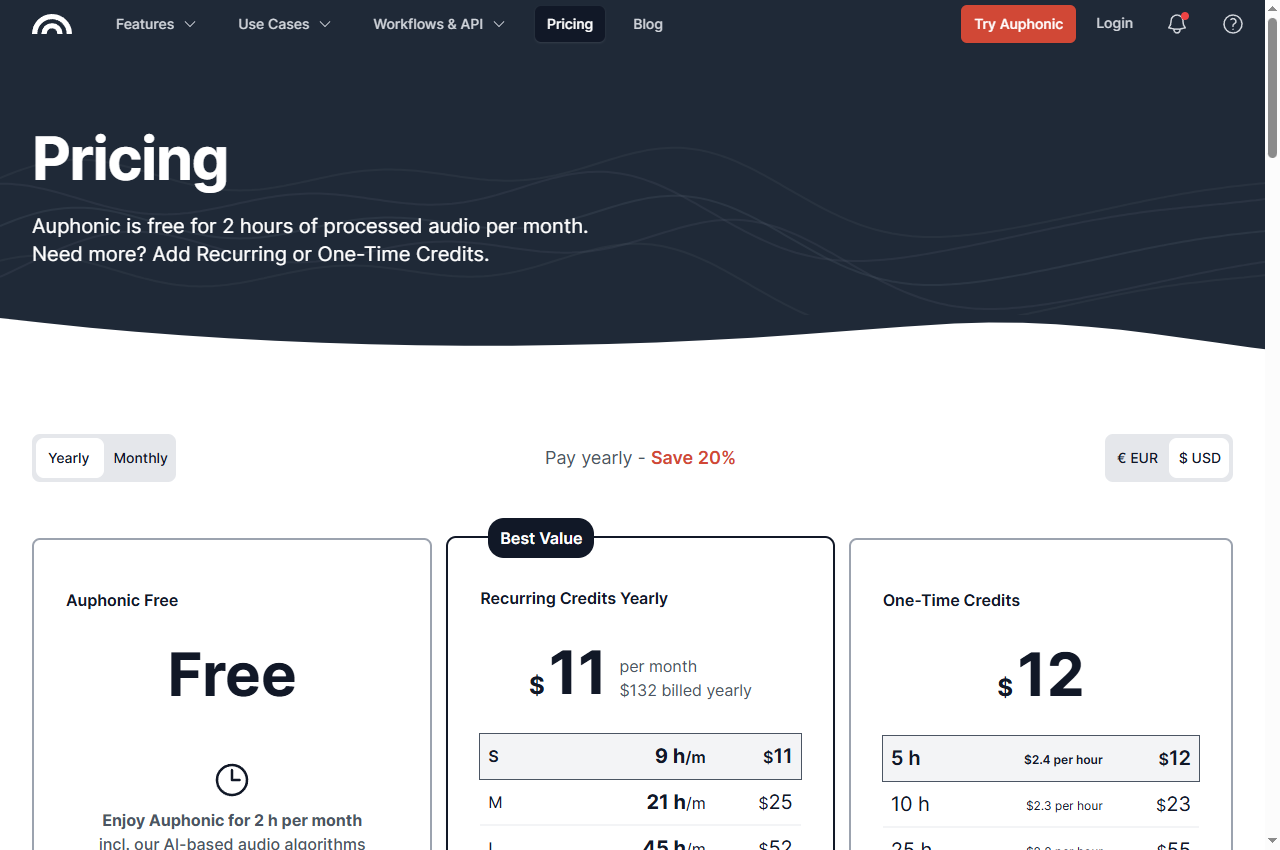
Auphonic's pricing page states that it is free for two hours of processed audio per month including its AI algorithms, with a jingle on productions by free users and no stacking of unused free credits. The feature table lists intelligent leveling, noise and reverb reduction, filtering and enhancement, loudness specifications, filler and silence cutting, encoding and metadata, video support and audiograms, external service connections, automatic publishing and API access as available on the free tier.
The documented exclusions are narrow and specific: multitrack productions are limited to under twenty minutes on free, and multilingual speech recognition and automatic shownotes and chapters are not included. Those two features are what the paid tiers add for a podcast workflow, so the choice between tiers is largely about whether shownotes and chapters are part of your process.
Paid options are metered in processed hours rather than seats: recurring credits start at $11 per month billed yearly for nine hours, and one-time credits start at $12 for five hours, with the per-hour rate falling as block size rises. A weekly one-hour show fits inside the recurring entry tier with room for reprocessing.
When to skip: if a jingle on the output is unacceptable, or if you need shownotes and chapters, which are not free-tier features.
The Adobe Podcast plans page describes the free plan's Enhance Speech as audio only, with no video support, no bulk processing, no strength adjustment, a thirty-minute maximum duration up to 500 MB and a one-hour maximum per day. Studio on free allows downloads of projects up to thirty minutes and two projects per day, without download of original recordings and with podcast-branded audiograms.
The paid plan adds adjustment of speech, music and ambience, video support, bulk upload, files up to two hours and 1 GB, up to four hours of enhancement per day, no Studio download limits, download of original recordings separated by speaker, and removal of the podcast branding, alongside 4,000 generative credits per month.
For a multi-guest episode, the paid feature that matters most is the speaker-separated download of original recordings, because it allows per-speaker processing elsewhere. On the free tier that option is not available, which limits how far the free plan can be integrated into a multi-track workflow.
When to skip: if you need to process more than an hour a day, if your files exceed thirty minutes, or if you need speaker-separated downloads.
Map your process before comparing products. Write down the steps you currently perform — recording, cutting, noise treatment, leveling, shownotes, export, publish — and mark which ones are weak. A tool is worth paying for only if it removes a step that is currently costing you time or quality.
Then check whether the tool replaces a step or adds one. A cleanup service that requires an export and reimport between editing and publishing may cost more time than it saves, unless the improvement in the audio is material.
Finally, check the allowance against your episode length and cadence. A two-hour monthly allowance suits a monthly show; a weekly show needs an allowance measured in at least four to eight hours a month, including reprocessing.
A short verification you can run
Use one real episode, at its real length, through the full process you intend to adopt. This is a proposed verification design, not a completed comparative test.
Process a full-length episode, not a sample. Duration caps only appear at the boundary.
Keep the original tracks. Never let a processed mix become your only copy.
Check the words. Verify names, numbers and sentence endings against the source. Cleaner audio does not prove the content is intact.
Compare across episodes. Apply the same process to two episodes recorded in different rooms and check that the results sound consistent.
Confirm the delivered file and the branding. Check the final export for duration, loudness and any vendor jingle or watermark.
Pricing and free-plan limits
Riverside's free plan documents two hours of multi-track recordings at up to 720p with a watermark; Pro is $24 per month billed yearly with 4K, no watermark and fifteen hours of separate-track downloads. Descript's free plan allows sixty media minutes a month at 720p without watermark-free export; Hobbyist is $16 per person per month and Creator $24.
Auphonic is free for two processed hours per month with a jingle on free productions, then $11 per month billed yearly for nine hours or $12 one-off for five hours. Adobe Podcast's free plan caps enhancement at thirty minutes per file and one hour per day, with the paid plan raising this to four hours a day and removing the podcast branding.
Convert each allowance to finished episodes per month before comparing. Recording hours, media minutes, processed hours and file caps are not interchangeable, and a plan that looks cheap in one unit may be the most expensive in the unit your workflow actually consumes.
Limits and when to skip a free plan
Skip the free tier when the output carries a watermark or jingle, when the allowance is smaller than one episode, when the feature you need is gated — shownotes, chapters, speaker-separated downloads or strength adjustment — or when the file-length cap is below your episode length. Each of these is documented.
Watch for the branding conditions specifically, because they are easy to miss. A jingle at the start of a production and a branded audiogram are both documented free-tier behaviours on tools in this shortlist, and both are audible or visible to your audience.
Re-verify before committing. Podcast plan structures change frequently, and the figures here carry the check date printed on the page.
Build a repeatable acceptance checklist
Before publishing an episode, check that the loudness matches your other episodes, that speech is intelligible throughout, that any edit joins are inaudible, that the metadata and chapters are correct, and that the delivered file meets each destination's specification. Keep the source tracks.
Keep one accepted episode as a reference standard. Re-check it whenever you change tool or setting, so that a change in processing behaviour is noticed before it reaches your feed.
Official pricing pages were checked September 17, 2026. This is a documentation-verification guide. No output-quality ranking is claimed.
Frequently asked questions
Do I need more than one tool for a podcast episode?
Usually yes, because these products cover different stages. A common sequence is to record in a multi-track tool, edit the transcript, run one cleanup pass, then apply a consistent loudness and metadata standard at export. Only you can decide which of those steps your current process lacks.
Why does free podcast software add a jingle?
Auphonic's pricing page states that productions of free users come with a jingle, and Adobe Podcast documents podcast branding on Studio downloads on the free plan. Both are documented trade-offs rather than defects, and both are audible in the published episode.
How many hours per month should I budget?
Measure your episode length and cadence, then add reprocessing. A weekly one-hour show with one retry per episode needs roughly eight to ten processed hours a month, which is above the free allowances described here.
Can I record separate tracks without paying?
Riverside's free plan documents two hours of multi-track recordings, which is enough to evaluate the workflow on a few episodes. A recurring series needs a paid tier for both the track hours and the watermark-free export.
Is this a quality ranking of post-production tools?
No. The comparison is built from published plan documentation. The verification steps are proposed editorial guidance, not a completed comparative test.