Best AI Voice Isolation and Noise Removal Tools 2026
Compare LALAL.AI, Adobe Podcast, Descript and Krisp when the job is separating a voice from everything else in the recording. The first question is whether you need real-time suppression during a call or file-based separation afterwards; they are different products.
AI Tool Finder Editorial Team · Sources checked September 17, 2026
Direct answer: choose by real-time or file-based
Shortlist LALAL.AI for file-based stem separation with a free ten-minute allowance, Adobe Podcast for a single speech-cleanup pass on a voice recording, Descript for isolation inside a text-based editing workflow, and Krisp for real-time suppression during calls. Krisp is the only real-time option here and the only one with no free plan, so the live-call use case decides itself.
This is a documentation-verification guide. Plan allowances and documented capabilities below are quoted from each vendor's own page on the check date. We have not processed the same recording in all four tools, so no separation-quality ranking is claimed.
Four candidates were kept because they cover four different isolation contexts: file-based stem separation, hosted speech cleanup, isolation inside an editor, and real-time call suppression. Tools that only reduce steady background noise, with no separation of voices or music, were left out.
Each card links to the vendor's own page. No audio samples are embedded. Nothing here is a separation-quality ranking.
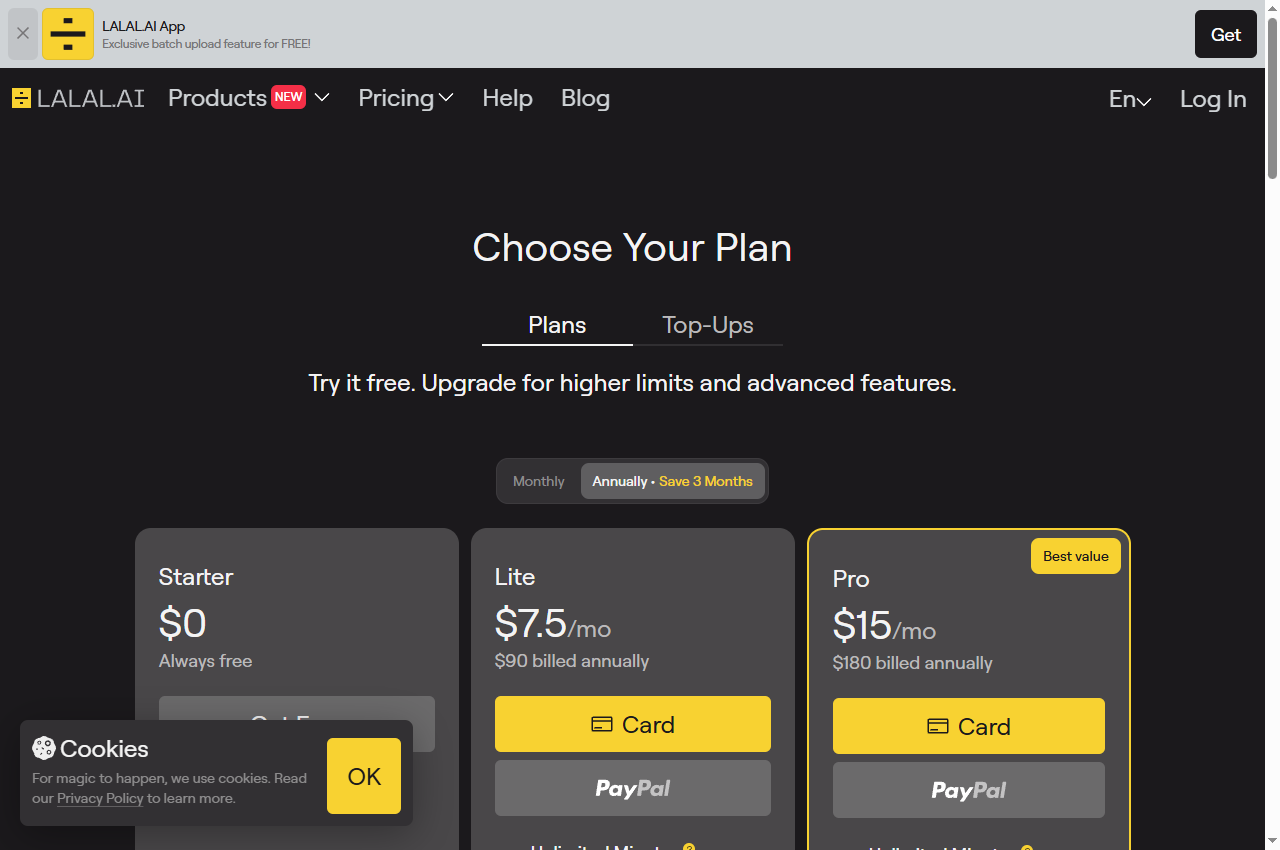
Official page captured 22 September 2026. Pricing and interface may change. Open the current official page. This is a source preview, not a product test result.
Read the charging rule before planning a job. The pricing FAQ states that minutes are deducted by file length multiplied by the number of stem types selected, so separating a file into three stems costs three times the file duration.
Enhance Speech reduces noise and echo in voice recordings; the free plan caps files at 30 minutes and one hour per day.
Best for
Cleaning a voice recording in one pass
Check first
The audio-only limitation and the 30-minute file cap
Limitations
The free plan processes audio only with no video support, no bulk upload, no strength adjustment, a 30-minute maximum per file and a one-hour daily cap.
This is a cleanup tool rather than a stem separator: it improves the voice that is there instead of splitting the recording into parts. That is the right operation when the problem is noise around a single speaker.
Studio Sound treats noise and echo inside the same editor used to assemble the programme; the free plan allows 60 media minutes a month.
Best for
Cleaning audio while editing the same project
Check first
The 60-minute monthly media allowance on free
Limitations
The free plan is documented with 60 media minutes per month, 100 one-time AI credits, 720p export and no watermark-free export, with AI tools listed as limited.
The advantage is that isolation happens in the same place as the edit, so there is no export-and-reimport step between cleaning the audio and cutting the programme. The free allowance is small, which makes it an evaluation tier.
This is the only option here that works during a live conversation rather than on a file, and the only one with no free plan at all. If the requirement is a clean live call, that combination is decisive.
Quick comparison table
Tool
Best for
Access and cost model
Unit to verify
Open tool
LALAL.AI
Separating vocals from music or isolating a stem
Starter free with 10 minutes in the relaxed queue; Lite from $51.75/month for 90 fast-queue minutes
Processing minutes, file-length caps, editing minutes and a per-seat subscription are different meters. Check whether the tool works on a live call or on a finished file before comparing any of them.
Four voice isolation options compared
LALAL.AI: file-based stem separation
LALAL.AI's pricing page lists a Starter tier described as Always free with 10 minutes in the relaxed queue and a 200MB upload limit per file, against Lite and Pro tiers that add 90 and 250 fast-queue minutes per month respectively. Batch processing, result downloads, voice-pack slots and API access are documented as paid-tier features.
The charging rule is published and consequential. The FAQ states that minutes are deducted based on file duration, and that for stem separation the number of stem types selected also affects the total, with the formula given as total file length multiplied by the number of stem separation types. A ten-minute file split three ways therefore consumes thirty minutes of allowance.
Paid tiers also differ by capability rather than volume alone: the VST plugin is documented as available on the Pro plan only, and the desktop application and API access are similarly positioned. If the separation needs to happen inside a DAW, the entry tiers are not sufficient.
When to skip: if you need real-time suppression, or if a single file exceeds the 200MB upload limit on the free tier.
Adobe's plans page describes the free tier of Enhance Speech as audio only with no video support, no bulk processing, no strength adjustment, a maximum duration of thirty minutes up to 500 MB and a one-hour maximum per day. Studio downloads on free are limited to projects up to thirty minutes and two projects per day, with no download of original recordings.
The paid tier adds the controls needed for mixed material: adjustment of speech, music and ambience for a more natural sound, bulk upload, video support, files up to two hours and 1 GB, and four hours of enhancement per day. Download of the original recording separated by speaker is also a paid feature.
The distinction from a stem separator matters. Where a recording contains two speakers and you need them apart, cleanup does not do that; where it contains one speaker and intrusive noise, cleanup is the simpler and usually sufficient operation.
When to skip: if you need to separate multiple speakers, or to work with video, or on files longer than thirty minutes.
Descript's pricing page lists a Free plan at $0 with 60 media minutes per editor per month, 100 one-time AI credits, two recording hours per drive, 720p export for both local and web-link exports, a one-hour web-link export duration, 5GB of cloud storage and a 1GB maximum file size. Watermark-free video export is not included on the free column.
Studio Sound is listed in the AI tools section on all four plans as Limited, and the plan cards describe the paid tiers as watermark-free at 1080p on Hobbyist and 4K on Creator and Business. Hobbyist is $16 per person per month, Creator $24 and Business $50, with Enterprise quoted on request.
For isolation work, the binding constraint on free is the 60-minute monthly media allowance rather than the tool availability. Studio Sound is present at every tier, so the free plan is a genuine test of the separation quality on a short piece — it is simply too small to carry a recurring show.
When to skip: if you need a watermark-free export, or if your monthly media exceeds sixty minutes, or if your source file is larger than 1GB on the free plan.
Krisp's pricing page lists a seven-day free trial with all premium features and no credit card required, rather than a standing free plan. The Meeting AI tiers are Core at $16 per user per month monthly or $8 billed annually, Advanced at $30 or $15 annually, and Enterprise on request.
Noise cancellation is documented as unlimited on every Meeting AI tier, along with unlimited transcription and unlimited audio and video recording. The differences between tiers appear in accent conversion allowances, storage and administration features rather than in the noise cancellation itself.
The FAQ states that there is no separate noise-cancellation-only plan because noise cancellation is built into every Krisp plan. For a team that only wants suppression, that means paying for the broader meeting assistant; for a team that also wants transcription and notes, the combination may be reasonable value.
When to skip: if you need a free tier for occasional use, or if you only need file-based processing rather than live suppression.
Decide first whether the recording is live or finished. Real-time suppression is a different product from file-based separation, and no tool here does both. If the problem happens during calls, only a real-time tool helps; if it happens in a finished file, a separation or cleanup tool is the right category.
Then decide whether you need separation or cleanup. Separation splits a mixed recording into parts, which is what you need when music or a second voice must be removed. Cleanup improves the voice that is present, which is usually enough when there is one speaker and intrusive noise.
Finally, read the charging rule rather than the allowance. Where minutes are charged per stem type, a headline allowance can represent a fraction of the file duration you assumed.
A short verification you can run
Use an excerpt from a recording you own that contains both speech and the interference you need to remove. This is a proposed verification design, not a completed comparative test.
Keep the original. Never make the processed file your only copy.
Choose the hardest section. Pick the passage where the speaker is quietest and the interference is loudest.
Listen for speech damage. Check consonants, sibilance and the ends of words. Aggressive isolation often removes more voice than noise.
Check the number of stems and the cost. Where minutes are charged per stem, note what the operation actually consumed.
Export and reopen. Confirm duration, channel layout and format in the delivered file.
Pricing and free-plan limits
LALAL.AI's Starter tier is free with ten minutes in a relaxed queue and a 200MB upload limit, with Lite from $51.75 per month for ninety fast-queue minutes and Pro from $104.25 for two hundred and fifty, both billed annually. Adobe Podcast's free plan caps files at thirty minutes and one hour per day; the paid plan raises this to four hours per day with strength adjustment.
Descript's free plan allows sixty media minutes per month with 720p export and no watermark-free export; Hobbyist is $16 per person per month, Creator $24 and Business $50. Krisp offers a seven-day trial with no free plan, and its meeting tiers start at $16 per user per month monthly or $8 billed annually.
Note how different the buying units are: minutes of processing, minutes of media, file caps and seats. Comparing the headline prices of these four products is not meaningful without first deciding which unit your workflow consumes.
Limits and when to skip a free plan
Skip the free tier when it is a trial rather than a plan, when the output is not permitted to leave the platform without a watermark, when your file exceeds the documented size or duration cap, or when the feature you need is gated to a paid tier. Each of these is documented.
Be careful with aggressive isolation. Removing too much can leave a voice that is clean but unnatural or partly missing, and a listener may not notice the loss until a name or number is misheard. Compare the processed voice against the original at matched loudness rather than accepting the first result.
Re-verify before committing. Plan structures in this category change often, and the figures here carry the check date printed on the page.
Build a repeatable acceptance checklist
Before publishing isolated audio, check that all speech is intact, that no musical or ambient element you wanted to keep has been removed, that the level is consistent with the rest of the production, and that the delivered file meets the destination's requirements. Keep the source alongside the processed version.
Save one reference excerpt that represents an acceptable separation. Re-run it whenever you change tool or settings, so a change in behaviour is caught before it reaches a published recording.
Official pricing pages were checked September 17, 2026. This is a documentation-verification guide. No separation-quality ranking is claimed.
Frequently asked questions
What is the difference between voice isolation and noise removal?
Isolation separates a voice from other elements in the recording, such as music or a second speaker. Noise removal reduces steady background sound around a voice. Some tools do both, and the pricing pages usually describe which operation consumes the allowance.
Can I remove background noise from a live call?
Yes, with a real-time tool rather than a file-based one. Krisp documents unlimited noise cancellation on all of its Meeting AI tiers, but it offers a seven-day trial rather than a free plan, so the entry cost is a subscription.
How are separation minutes charged?
LALAL.AI's pricing FAQ states that minutes are deducted by file duration and that selecting more stem types increases the total, with the formula given as total file length multiplied by the number of stem separation types. A three-stem split costs three times the file duration.
Why is there no free plan for live noise cancellation?
Krisp's FAQ states that there is no separate noise-cancellation-only plan because the feature is built into every plan. The free entry point is a seven-day trial of the full product rather than a standing free tier.
Is this a separation-quality ranking?
No. The comparison is built from published plan documentation. The verification steps are proposed editorial guidance, not a completed comparative test.